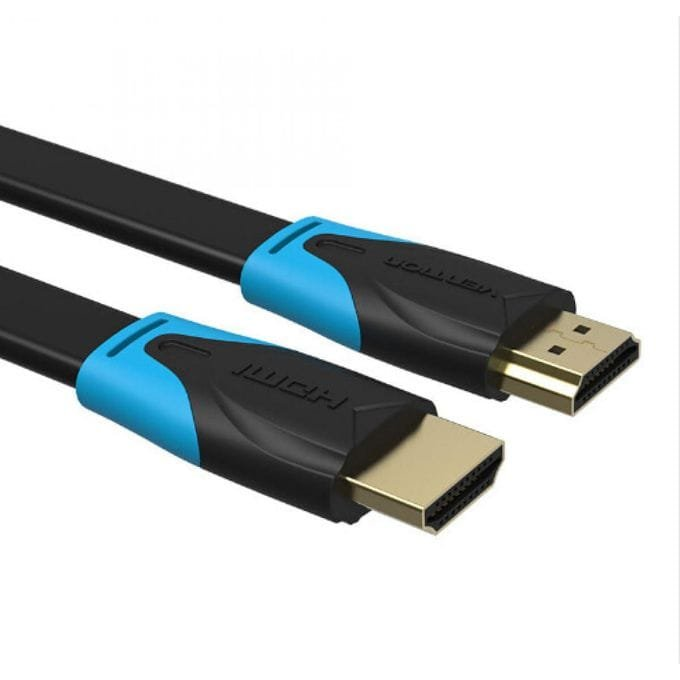
Vention Flat HDMI Cable 10M (VAA-B02-L1000)
The Vention VAA-B02-L1000 is a 10-meter flat HDMI cable engineered for extended discreet installations where cable visibility must be minimized across larger spaces. This ultra-slim profile cable can be routed under carpets, along architectural features, or through tight spaces without creating visible bulges or obstructions. It provides reliable 4K video transmission for home theaters, conference rooms, and commercial displays where professional aesthetics and extended reach are both essential.
Technical Specifications
Cable Specifications
- Length: 10 meters (32.8 feet)
- Cable Type: Flat passive HDMI
- HDMI Version: 2.0 standard compliant
- Conductor Material: Tinned oxygen-free copper conductors
- Cable Profile: Flat design approximately 1.5mm thick × 12mm wide
- Outer Jacket: Durable flexible PVC material with matte finish
Performance Characteristics
- Maximum Resolution: 4K (3840×2160) at 60Hz
- Supported Resolutions: 1080p at 120Hz, 1440p at 75Hz, 2K at 60Hz
- Bandwidth: 18 Gbps data transfer rate
- Color Depth: Supports up to 48-bit Deep Color
- Audio Support: High-definition audio including Dolby TrueHD, DTS-HD Master Audio, Audio Return Channel (ARC), and eARC
Physical Design
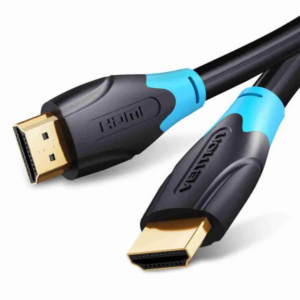
- Connector Type: HDMI Type A (Standard) male to male
- Connector Plating: 24K gold-plated contacts
- Cable Thickness: 1.5mm for concealed installation
- Cable Width: 12mm flat profile
- Cable Weight: ~350g total weight
- Color: Black matte finish for visual discretion
Features & Standards
- HDR Support: HDR10, Dolby Vision, and HLG compatible
- 3D Video Support: Full stereoscopic 3D content transmission
- HDMI Ethernet Channel: HEC enabled for network connectivity
- Content Protection: HDCP 2.2 compliant for streaming services
- Compliance: RoHS certified, CE marked for safety
Compatibility & Environmental
- Device Compatibility: Compatible with smart TVs, projectors, monitors, gaming consoles, media players, laptops, AV receivers, and streaming devices
- Operating Temperature: 0°C to 50°C (32°F to 122°F)
- Storage Temperature: -20°C to 70°C (-4°F to 158°F)
- Humidity Range: 10% to 90% non-condensing
Use Cases & Applications
Large Room Home Theater Systems
Homeowners connect equipment racks positioned in closets or back rooms to wall-mounted displays across living spaces. The Vention VAA-B02-L1000 routes through wall cavities, under flooring, or along architectural trim without visible cable presence. The 10-meter length accommodates open-concept layouts where entertainment equipment must remain separated from viewing areas for aesthetic or acoustic reasons.
Conference Room Installations
Corporate facilities connect presentation systems to projectors or large displays positioned across conference spaces. AV integrators route the flat cable under carpet tiles, along cable trays, or through ceiling access points to maintain professional meeting environments. The cable eliminates visible wire runs that distract from presentations while providing reliable connectivity for laptops and media players.
Retail Digital Signage Networks
Stores and showrooms connect media players to displays positioned throughout retail spaces while maintaining clean visual presentation. The Vention VAA-B02-L1000 routes discreetly along walls, under flooring transitions, or behind fixtures without exposing commercial infrastructure. Marketing teams can position displays for optimal customer engagement while hiding technical equipment in back-of-house areas.
Multi-Room Entertainment Distribution
Residential installations distribute video content from centralized equipment to displays in adjacent rooms or different floor levels. The flat design enables routing through doorways, along hallways, and up stairwells without conventional cable management systems. Homeowners avoid the expense of in-wall installation while achieving clean results comparable to professional structured wiring.
Gaming Setup Extensions
Dedicated gaming rooms connect consoles and gaming PCs to displays positioned across larger spaces for immersive experiences. The 4K@60Hz support maintains visual quality for modern gaming while the 10-meter reach allows flexible equipment placement. Gamers can position consoles near optimal seating arrangements while displays mount for ideal viewing angles without compromising cable aesthetics.
Educational Facility Classrooms
Schools and universities connect teaching stations to projection systems or interactive displays across classrooms. Teachers operate source equipment from instructor positions while displays mount for student visibility. The flat cable routes along floors or walls without creating trip hazards in high-traffic educational environments where student safety is paramount.
Hospitality & Hotel Applications
Hotels install guest room entertainment systems with equipment hidden in furniture or closets while displays mount on walls. The Vention VAA-B02-L1000 enables discreet connections that maintain room aesthetics and prevent guest tampering with equipment. Maintenance teams appreciate the installation flexibility during room renovations or technology upgrades.
Installation Considerations
Extended Length Routing Planning
Before installation, map the complete cable path considering all turns, transitions, and obstacles. The 10-meter length allows generous routing but requires careful planning to avoid unnecessary loops or sharp angles. Measure the actual path distance accounting for baseboards, doorways, and furniture clearances rather than straight-line measurements between equipment.
Under-Carpet Installation Methods
For installations under carpets or area rugs, start from one end and gradually feed the cable under the carpet edge using a thin flexible tool. Work in small sections rather than attempting to push the entire length at once. Position the cable along room perimeters where foot traffic is lighter and furniture weight is distributed rather than concentrated. The cable performs best under carpets with adequate padding that prevents crushing from foot traffic.
Wall and Baseboard Routing
When routing along baseboards or architectural trim, use small adhesive cable clips spaced every 50-70 centimeters to maintain flat contact against surfaces. Ensure the cable lies completely flat without waves or ripples that become visible. Paint-matched clips blend with trim colors for truly invisible installations. Alternatively, position the cable in the shadow gap between baseboard and flooring where it remains concealed.
Door Frame and Threshold Transitions
The 1.5mm thickness fits under most standard interior doors with adequate clearance. Test door operation after installation to ensure no binding or pinching occurs. For tight-clearance doors, route along the hinge side of frames or use flat cable door frame channels. When crossing thresholds between rooms, use transition strips designed for flat cables or route along adjacent walls to avoid the threshold entirely.
Cable Protection in High-Traffic Areas
While the flat design reduces trip hazards, areas with heavy foot traffic benefit from additional protection. Use low-profile cable raceways or cord covers in hallways and walkways where the cable crosses open floor space. For permanent installations in commercial spaces, consider routing under modular carpet tiles that can be lifted for cable access without disturbing the entire floor covering.
Signal Quality Maintenance
Avoid coiling or bundling excess cable tightly, as this can affect signal transmission at the 10-meter length. Instead, lay excess cable flat in gentle S-curves behind equipment or along wall surfaces. Keep the cable away from sources of electromagnetic interference such as power transformers, fluorescent lighting ballasts, and electric motors. Although passive cables are more susceptible to interference at extended lengths, the shielded construction minimizes issues in typical residential and commercial environments.
Connector Stress Relief
At both connection points, ensure adequate strain relief prevents tension on HDMI ports. Use small cable clips or adhesive mounts within 15-20 centimeters of each connector to anchor the cable and prevent pulling forces from reaching device ports. This practice is especially important for wall-mounted displays where gravity and cable weight create downward stress on connectors.



 No products in the cart.
Reviews
There are no reviews yet.