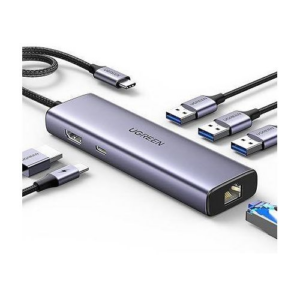
Gigabit Ethernet RJ45: Provides wired network speeds up to 1,000 Mbps with automatic speed negotiation (10/100/1000 Mbps), replacing an unstable Wi-Fi connection in offices, hotels, or campus environments where cabled LAN is available.
4K HDMI Output with HDR10 and 3D Support: Connects to an external display at up to 3840×2160@30Hz via HDMI 2.0 with HDCP 2.2 compliance, supporting HDR10 and 3D content — suitable for presentations, video playback, and extended desktop work.
100W USB-C Power Delivery: Passes up to 95W to a connected laptop or tablet (5W reserved for hub operation), allowing one USB-C charger to power both the adapter and the host device at the same time; the PD port handles charging only and does not carry data or video.
Dual USB-A 3.0 Ports: Two Type-A ports each support transfer speeds up to 5 Gbps — backward compatible with USB 2.0 and 1.1 — covering external drives, keyboards, mice, and USB flash storage simultaneously.
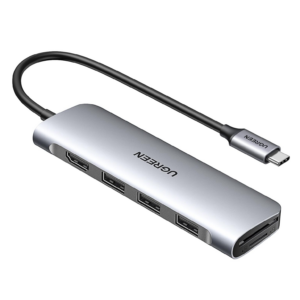
Simultaneous SD & TF Card Reading: Full-size SD and Micro SD slots operate independently at approximately 90 MB/s, reading and writing both cards at the same time — useful for photographers and videographers importing from multiple sources without a separate reader.
Dual 4K@60Hz HDMI Output via MST: Two HDMI 2.0 ports each output up to 3840×2160@60Hz with HDR support; Windows systems running MST deliver fully independent extended displays on both screens simultaneously, while macOS limits dual-monitor output to mirror mode — a key consideration for MacBook users comparing this hub against DisplayLink alternatives such as the Revodok Pro 209 (SKU 90912).
Mixed-Speed USB Port Configuration: The two USB-C ports and one USB-A port operate at USB 3.2 Gen 2 (10 Gbps) for fast external SSDs and NVMe enclosures, while a second USB-A port runs at USB 3.0 (5 Gbps) for standard peripherals — covering both high-bandwidth storage and everyday devices without competition for bandwidth.
Plug-and-Play — No Driver Required: Unlike DisplayLink-based docking stations, the 45380 works immediately on Windows, macOS, Linux, and ChromeOS upon connection, with no software installation, no power button, and no driver update cycle to manage.
Gigabit Ethernet — 1,000 Mbps: The RJ45 port auto-negotiates to 10/100/1000 Mbps, providing a stable wired network connection for video conferencing, VPN access, and large file transfers — active simultaneously with both HDMI outputs and all USB ports.
Simultaneous SD and TF Card Reading: Independent full-size SD and Micro SD slots read and write both cards concurrently at up to 104 MB/s using SD 3.0 — suitable for photographers and video editors importing from dual card formats directly to a connected external drive via the 10 Gbps USB ports.
4K@60Hz HDMI with Simultaneous VGA: The HDMI 2.0 port delivers up to 3840×2160@60Hz for modern displays, while the VGA port runs 1080p@60Hz for legacy monitors and projectors — both outputs operate at the same time on Windows in extended or mirror mode; macOS restricts dual-display configurations to mirror mode only.
Mixed 10 Gbps and 5 Gbps USB Configuration: Two USB-C ports and one USB-A port operate at USB 3.2 Gen 2 (10 Gbps) for fast external SSDs and NVMe enclosures; a second USB-A port provides USB 3.0 (5 Gbps) for standard peripherals — all four data ports are independent and carry data only, with no video or charging function.
3.5mm Audio Output: A dedicated 3.5mm jack routes audio from the host device to headphones, earphones, or powered speakers — useful for ultrabooks and tablets that lack a built-in headphone socket; note the port supports audio output only and does not carry microphone input.
Gigabit Ethernet — 1,000 Mbps: The RJ45 port auto-negotiates to 10/100/1000 Mbps, providing stable wired connectivity for video conferencing, VPN access, and large file transfers without relying on Wi-Fi throughput.
Fast SD and TF Card Reading: Independent full-size SD and Micro SD slots read and write both cards simultaneously at up to approximately 170 MB/s using SD 3.0 — faster than many competing hubs — supporting UHS-I cards from cameras, drones, and action cameras.
100W USB-C PD pass-through charging (95W delivered to host): The dedicated USB-C power port accepts up to 100W from a compatible PD charger and passes up to 95W through to the host laptop — with 5W reserved for hub operation. This means a MacBook Pro or Dell XPS continues charging at close to its rated wattage while the hub is fully in use. Note: the PD port supports power delivery only — it does not carry data or video. Avoid plugging or unplugging the PD charger while screencasting to prevent image or data interruption.
4K@30Hz HDMI display output: The HDMI port outputs video at up to 3840×2160 at 30Hz in both mirror and extend modes, downward compatible with 1080p, 1080i, and 720p. This suits external monitors, HDTVs, and projectors in home, office, and presentation environments. HDMI video output requires the host USB-C port to support DisplayPort Alternate Mode — standard charging-only ports do not output video.
Mixed USB-A port configuration for data and peripherals: The hub provides one USB-A 3.0 port at 5Gbps for fast storage and data devices, plus two USB-A 2.0 ports at 480Mbps for lower-bandwidth peripherals such as keyboards, mice, and printers. This arrangement directs bandwidth efficiently — high-speed storage uses the 3.0 port, while always-on peripherals occupy the 2.0 ports without competing for USB 3.0 throughput.
CNC-machined aluminium housing at 54.5g: The aluminium body is machined using computer-numerical-control (CNC) processes for a consistent finish and tight dimensional tolerances. The aluminium shell handles heat dissipation during simultaneous PD charging and video output more effectively than polycarbonate alternatives, and the 24cm braided USB-C cable resists wear from repeated packing and travel use.
Broad compatibility with USB-C and Thunderbolt 3/4 devices: The hub works plug-and-play across Windows, macOS, and Linux without driver installation. It is additionally compatible with Samsung DeX, allowing Galaxy smartphones and tablets to run a desktop-style interface on an external monitor through the hub's HDMI port.
Thunderbolt 3 USB-C port — 40Gbps, 6K video, 100W PD: The dedicated USB-C Thunderbolt 3 output delivers the full Thunderbolt 3 feature set: data transfer at up to 40Gbps with Thunderbolt devices (and 10Gbps with USB 3.1 Gen 2 devices), video output at up to 6K@60Hz to a compatible Thunderbolt display, and 100W Power Delivery pass-through charging (20V/5A, 15V/3A, 9V/3A, 5V/3A). This makes it possible to connect a 6K Pro Display XDR and charge the MacBook simultaneously through a single Thunderbolt cable.
4K@30Hz HDMI output for external displays: The HDMI port outputs at up to 3840×2160 at 30Hz, downward compatible with 1080p and 720p, supporting both mirror and extend display modes with synchronised audio. Used together with the Thunderbolt 3 USB-C video output, the CM380 enables a dual-display configuration — a 5K or 6K display via Thunderbolt and a 4K monitor or projector via HDMI simultaneously.
Simultaneous SD and TF card reading at up to 100MB/s: Both the full-size SD card slot and the TF (Micro SD) slot operate concurrently, each supporting transfer speeds up to approximately 100MB/s. Consequently, photographers and videographers can offload footage from a camera SD card and a drone Micro SD card at the same time without switching media or using a separate reader.
Two USB-A 3.0 ports at 5Gbps: Each USB-A 3.0 port transfers data at up to 5Gbps, suitable for external SSDs, USB flash drives, keyboards, mice, and USB peripherals. Both ports operate simultaneously with all other hub ports, including during active video output and Thunderbolt data transfer.
Dual USB-C input designed to fit MacBook Pro and Air: The 6-in-2 design uses two USB-C male connectors that plug into the two Thunderbolt / USB-C ports on the left side of compatible MacBook Pro and MacBook Air models. The aluminium housing is finished to match MacBook Space Gray, sitting flush against the laptop body without protruding awkwardly. Note: remove any protective MacBook case before connecting the hub to ensure a proper fit.
5Gbps USB 3.2 Gen 1 data across all four ports: Each port operates at up to 5Gbps, ten times faster than USB 2.0's 480Mbps ceiling. Consequently, large file transfers, HD video streaming from external drives, and simultaneous multi-device operation complete significantly faster than on older USB 2.0 hubs.
USB-C power input for sustained high-load use: The dedicated DC 5V/2A USB-C power port supplies additional current when two or more power-hungry devices — such as external 2.5-inch HDDs or SSDs — are connected simultaneously. Without external power, UGREEN recommends connecting no more than two 1TB hard drives at once. The power port does not charge the host device.
Nickel-plated connectors rated to 20,000 bends: Nickel plating on the USB-A host plug and output connectors resists corrosion and maintains electrical conductivity over extended use. The cable has passed 20,000 bending cycle tests, offering meaningfully greater durability than standard untested PVC cables.
Multi-layer device protection: Built-in over-current, over-voltage, over-temperature, and short-circuit protection safeguards both the hub and connected peripherals during sustained operation. This is particularly relevant when running external drives or other continuously powered devices.
LED connection indicator and plug-and-play setup: A white LED indicator provides at-a-glance confirmation of the hub's connection status to the host device. No driver installation is required on Windows, macOS, Linux, or Chrome OS — the hub operates immediately upon connection.
HDMI 2.1 Port for 8K@30Hz Single-Display Output: The second HDMI port (HDMI 2) uses HDMI 2.1 and supports resolutions up to 7680×4320@30Hz when connected to a single 8K monitor on Windows — four times the pixel count of 4K and future-proofed for emerging 8K professional display workflows; note that 8K output requires the host device to support DisplayPort 1.4 Alternate Mode.
Dual 4K@60Hz for Extended Multi-Monitor Work: When both HDMI ports are in use simultaneously, each delivers up to 4K@60Hz, enabling two independent 4K screens on Windows in extended mode; due to macOS MST limitations, MacBook users see mirrored content across both monitors rather than independent extended displays.
Mixed USB Port Configuration for Peripherals and Storage: The USB-C 3.0 and USB-A 3.0 ports each transfer data at up to 5 Gbps, suited for external SSDs and fast drives; additionally, two USB-A 2.0 ports handle low-bandwidth peripherals such as keyboards, mice, and wireless receivers without competing for bandwidth on the faster ports.
Gigabit Ethernet — 1,000 Mbps Wired Networking: The RJ45 port delivers stable wired connectivity at up to 1,000 Mbps, auto-negotiating to 10/100/1000 Mbps networks — a reliable alternative to Wi-Fi for video conferencing, VPN access, and network storage transfers.
Simultaneous SD and TF Card Reading: Independent full-size SD and Micro SD slots read and write both cards concurrently at up to 104 MB/s, supporting UHS-I cards — practical for importing from cameras, drones, and action cameras directly to connected storage in a single workflow step.
Triple Display Output: Two HDMI ports and one DisplayPort allow you to connect up to three external monitors simultaneously, enabling extended or mirror mode across all screens for multi-tasking workflows.
100W USB-C Power Delivery: The dock passes up to 100W of charging power back to your host device via USB-C PD 3.0, so your laptop charges while you work without occupying a separate port. A MacBook Pro 15″ reaches a full charge in approximately 1.5 hours.
10 Gbps Front-Panel Data Ports: The front-mounted USB-A 3.2 Gen 2 and USB-C 3.2 Gen 2 ports each deliver up to 10 Gbps, making large file transfers from drives, phones, or SSDs noticeably faster than standard USB 3.0 connections.
Gigabit Ethernet via RJ45: A dedicated Gigabit Ethernet port delivers adaptive 10/100/1000 Mbps wired networking, removing dependence on Wi-Fi for video calls, large uploads, or latency-sensitive applications.
Integrated SD and microSD Card Slots: Both slots support SD 3.0 with theoretical read speeds of up to 104 MB/s, allowing fast access to camera footage or project files without a separate adapter.
4K@60Hz HDMI with HDR10 and 3D Support: The HDMI 2.0 port outputs up to 3840×2160@60Hz with HDCP 2.2 compliance, HDR10 wide dynamic range, and 3D signal support — a step up from 4K@30Hz adapters, delivering smoother motion at full 4K resolution on compatible monitors and displays; 4K@60Hz requires the host device to support DisplayPort 1.4 Alternate Mode.
Gigabit Ethernet with Auto-Negotiation: The RJ45 port provides wired network speeds up to 1,000 Mbps, automatically adapting to 10/100/1000 Mbps networks — replacing Wi-Fi for stable VPN access, video conferencing, and large file transfers without a separate Ethernet dongle.
Dual USB-C Data Ports: Two USB-C ports each transfer data at up to 5 Gbps; both handle data only and do not support video output or charging, making them suitable for USB-C external drives, hubs, or other USB-C peripherals alongside the host connection.
Dual USB-A 3.0 Data Ports: Two Type-A ports each support up to 5 Gbps — backward compatible with USB 2.0 and 1.1 — providing simultaneous connections for keyboards, mice, flash drives, or external hard drives without occupying the USB-C data ports.
Simultaneous SD and TF Card Reading: Independent full-size SD and Micro SD slots read and write both cards concurrently at up to 104 MB/s using SD 3.0, supporting cards up to 2 TB — useful for photographers and videographers importing from multiple card formats in a single session.
Three USB-A 3.0 ports at 5Gbps — all active simultaneously: Three USB 3.0 ports support 5Gbps data transfer, enabling quick file sharing and seamless peripheral connections. All three ports operate concurrently, allowing a keyboard, mouse, and external drive to remain connected at the same time without any port dropping to legacy USB 2.0 speeds. HURTEL
Simultaneous SD and TF card reading: The dual card readers support SD and TF cards simultaneously, providing efficient data transfer for photographers and videographers. Both slots read concurrently at up to 104MB/s, allowing media from a camera SD card and a drone or action camera Micro SD card to be imported at the same time without switching between them. HURTEL
4K@30Hz HDMI output — mirror or extend: The 4K@30Hz HDMI output enables users to extend or mirror their display to an external monitor, perfect for presentations, video editing, and entertainment. Both mirror and extend modes are supported with synchronised audio. Video output requires the host USB-C port to support DisplayPort Alternate Mode. HURTEL
Space gray aluminium housing with no-driver setup: Crafted from high-quality space gray aluminium, the hub ensures superior durability and heat dissipation. The aluminium shell manages thermal load during simultaneous HDMI and USB 3.0 operation more effectively than polycarbonate alternatives. No driver installation is required on Windows, macOS, or Linux — the hub operates immediately upon connection. HURTEL
Bus-powered — no external power supply required: The hub requires no external power supply or driver installation — simply plug it into a USB-C port and it is ready to use. This keeps the travel footprint minimal. Users connecting power-hungry 2.5-inch hard drives to multiple ports simultaneously may benefit from connecting a USB-C power adapter to the host device's second USB-C port for stable drive operation. HURTEL
4K@60Hz HDMI output — mirror or extend: The HDMI port outputs at up to 3840×2160 at 60Hz when the host device's USB-C port supports DisplayPort 1.4 or higher, and at 4K@30Hz on hosts with DP 1.2. Both mirror and extend display modes are supported, with synchronised audio and video. Users can mirror or extend their screen to an HDTV, monitor, or projector for cinema-style playback, presentations, and dual-display workflows. Imaginext
Three USB-A 3.0 ports — all at 5Gbps: All three USB 3.0 ports support data transfer at up to 5Gbps — ten times faster than USB 2.0 — and operate simultaneously. Consequently, a keyboard, mouse, and external SSD can all run concurrently without any port dropping to legacy speeds. Imaginext
Simultaneous SD and TF card reading at up to 104MB/s: Both the SD and Micro SD (TF) card slots operate at the same time, reading simultaneously at speeds up to 104MB/s. This allows a photographer to offload a camera SD card and a drone Micro SD card concurrently without switching between cards or using a separate reader. The SD slot supports UHS-I cards (SD, SDXC, SDHC, RS-MMC), and the TF slot supports UHS-I Micro SD, Micro SDHC, and Micro SDXC cards. HURTELCamera Solutions
Aluminium shell with braided nylon cable: The smooth aluminium exterior dissipates heat during sustained multi-port use, while the braided nylon cable resists the fraying and kinking that affect standard PVC cables under daily packing and travel use. The braided cable also resists tangling, simplifying storage in a laptop bag or case. HURTEL
Multi-layer device protection: Built-in over-voltage, over-current, short-circuit, and high-temperature protection safeguards both the hub and connected peripherals during sustained operation. This is particularly relevant when running external hard drives or other continuously powered USB devices across multiple ports simultaneously. Camera Solutions
Three USB-A 3.0 ports at 5Gbps: All three USB-A 3.0 ports operate at up to 5Gbps — ten times faster than USB 2.0 — for connecting keyboards, mice, external drives, and flash drives simultaneously. The ports are also backward compatible with USB 2.0 and USB 1.1 devices, ensuring legacy peripherals connect without issue. HURTELUGREEN US
Gigabit Ethernet RJ45 at 10/100/1000Mbps: The Gigabit RJ45 Ethernet port supports 1000Mbps for a faster and more reliable wired network connection than Wi-Fi in congested office, hotel, or co-working environments. The port auto-negotiates between 10, 100, and 1000Mbps depending on the connected network infrastructure. A Cat 6 cable is recommended to achieve the full Gigabit ceiling. JG Superstore
4K@30Hz HDMI display output — mirror or extend: The HDMI port outputs at 4K@30Hz, supporting mirror and extend display modes for connecting laptops to external monitors, projectors, or HDTVs. Note: the HDMI port does not support HDR or 3D output. Video output requires the host USB-C port to support DisplayPort Alternate Mode — standard charging-only USB-C ports do not carry video. UGREENJG Superstore
100W PD pass-through — 85W delivered to host: The dedicated USB-C PD input accepts up to 100W from a compatible PD 3.0 charger and passes up to 85W through to the host device, with 15W reserved for hub operations. This keeps MacBook Pro, Dell XPS, and similar high-wattage laptops charging at close to their rated speed during full hub use. The PD port supports charging only and does not carry data transmission or video output. UGREENJG Superstore
Compact aluminium body with 15cm fixed cable: The hub combines all six ports in a very compact design with a short 15cm fixed USB-C cable, keeping the hub close to the laptop without trailing cables across the desk. The aluminium housing dissipates heat generated during simultaneous Ethernet, HDMI, and USB 3.0 operation, maintaining stable performance under sustained multi-port use. HURTEL
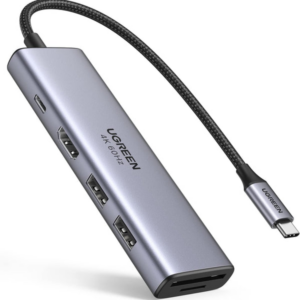
4K HDMI Output: Connects to an external monitor, projector, or HDTV at resolutions up to 3840×2160 — ideal for presentations, extended desktop setups, and media playback without a dedicated display adapter.
100W Power Delivery Pass-Through: The USB-C PD port delivers up to 95W of charging to a connected laptop (5W reserved for hub operation), so the adapter charges the host device while all other ports remain active.
Dual USB 3.0 Type-A Ports: Two USB-A ports each support transfer speeds up to 5 Gbps — ten times faster than USB 2.0 — making them suitable for external drives, wireless receivers, and USB peripherals.
Simultaneous SD & TF Card Reading: Built-in full-size SD and Micro SD (TF) slots read and write both cards at the same time at up to 104 MB/s, removing the need for a separate card reader when importing media from cameras or drones.
USB-C Data Port: A dedicated USB-C port provides an additional 5 Gbps data connection for USB-C storage devices or peripherals; note that this port handles data only and does not support video output or additional charging.
Gigabit Ethernet (RJ45): Delivers wired network speeds up to 1,000 Mbps, auto-negotiating to the highest available connection speed (10/100/1000 Mbps) — a reliable alternative to Wi-Fi on congested networks or in environments without wireless infrastructure.
4K@60Hz HDMI Output: Connects to an external monitor, projector, or display at up to 3840×2160 resolution in either Mirror or Extended mode; 4K@60Hz requires the host device to support DisplayPort 1.4 Alternate Mode, otherwise output defaults to 4K@30Hz.
100W USB-C Power Delivery: The PD port passes through up to 85W of charging to a connected laptop (15W reserved for hub operations), so one USB-C charger powers both the adapter and the host device simultaneously; note this port handles charging only and does not carry data or video.
Dual USB-A 3.0 Ports: Two Type-A ports each transfer data at up to 5 Gbps — ten times faster than USB 2.0 — accommodating external hard drives, USB flash drives, keyboards, and wireless receivers concurrently.
Simultaneous SD & TF Card Reading: Independent SD and Micro SD slots read and write both cards at once at up to 104 MB/s, removing the need for a separate card reader when importing media directly from cameras, drones, or smartphones.
Triple 4K Display Output (Windows): Two HDMI ports and one DisplayPort each support 4K@60Hz individually; Windows systems running MST (Multi-Stream Transport) can drive all three displays simultaneously at 4K@30Hz, while any dual combination delivers 4K@60Hz — a significant step up from single-display adapters.
10 Gbps USB 3.2 Gen 2 on All Data Ports: Both USB-C and both USB-A data ports operate at USB 3.2 Gen 2 speeds (10 Gbps) — twice the throughput of standard USB 3.0 — making this hub suitable for NVMe enclosures, fast SSDs, and high-bandwidth peripherals.
100W USB-C Power Delivery: The dedicated PD port passes up to 85W to a connected laptop (15W reserved for hub operation); it supports PD 3.0 and accepts up to 100W input, so one wall charger powers both the hub and the host device simultaneously; note this port handles charging only and does not carry data or video.
HDR Display Support: Each video output supports HDR, enabling dynamic contrast and wider colour range on compatible monitors — useful for photo and video editing workflows where colour accuracy matters.
Built-in Safety Protections: Over-current protection, short-circuit safeguards, and an anti-backflow design protect both the hub and connected devices during intensive multi-device operation.
Dual 4K HDMI with Legacy VGA Support: Two HDMI 2.0 ports each output up to 4K@60Hz for modern displays, while the VGA port provides 1080p@60Hz output for projectors, older monitors, and display equipment without HDMI — making this dock particularly useful in corporate or classroom environments where legacy hardware remains in use.
Triple Display on Windows via MST: Windows systems with a USB-C port supporting DisplayPort Alternate Mode can drive all three video outputs simultaneously using Multi-Stream Transport; however, when VGA is active, the analogue ceiling limits all outputs in that configuration to 1080p@60Hz. For 4K triple-display setups, the DisplayPort variant (SKU 35625) is the appropriate alternative.
10 Gbps USB 3.2 Gen 2 Across All Data Ports: All four USB ports — two Type-A and two Type-C — operate at USB 3.2 Gen 2 speeds (10 Gbps), twice the throughput of USB 3.0; this accommodates NVMe enclosures, high-speed SSDs, and bandwidth-intensive peripherals across all four connections simultaneously.
100W USB-C Power Delivery: The dedicated PD port passes up to 85W to a connected laptop (15W reserved for hub operation), using PD 3.0; a single wall charger thus powers both the hub and the host device; the PD port is dedicated to charging only and does not carry data or video signals.
Plug-and-Play Aluminium Build: No driver installation is required on Windows, macOS, or Linux; the aluminium alloy housing dissipates heat effectively during sustained multi-display and data-transfer loads, reducing thermal throttling during extended use.





 No products in the cart.