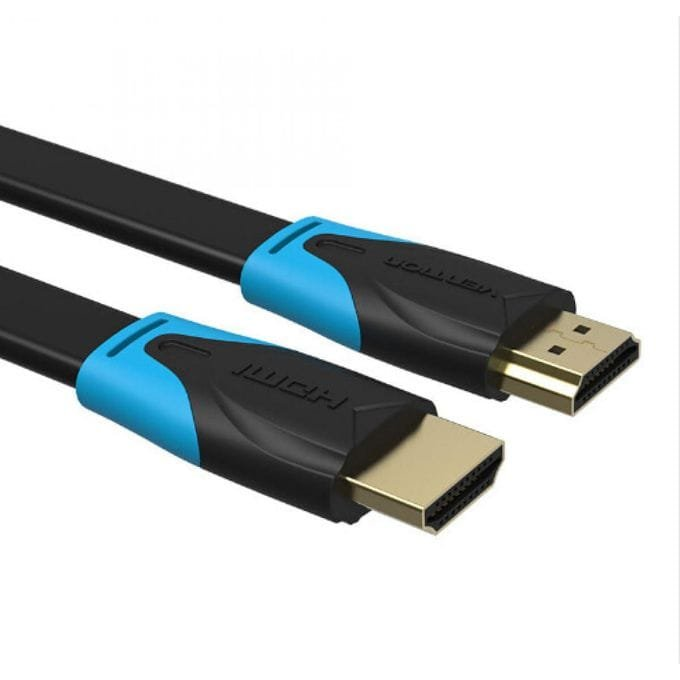
Vention Flat HDMI Cable 3M (VAA-B02-L300)
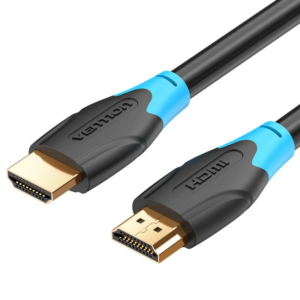
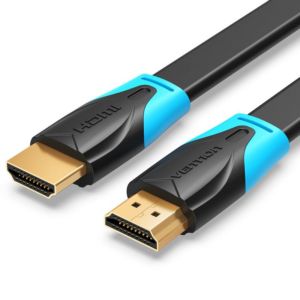
The Vention VAA-B02-L300 is a 3-meter flat HDMI cable designed for short to medium-distance connections where cable visibility needs minimal visual impact. This ultra-slim profile cable routes discreetly under carpets, along furniture edges, or behind wall-mounted displays without creating noticeable bulges. It delivers reliable 4K video transmission for living rooms, bedrooms, and small office setups where clean aesthetics and convenient connectivity are equally important.
Technical Specifications
Cable Specifications
- Length: 3 meters (9.8 feet)
- Cable Type: Flat passive HDMI
- HDMI Version: 2.0 standard compliant
- Conductor Material: Tinned oxygen-free copper conductors
- Cable Profile: Flat design approximately 1.5mm thick × 12mm wide
- Outer Jacket: Flexible PVC material with smooth finish
Performance Characteristics
- Maximum Resolution: 4K (3840×2160) at 60Hz
- Supported Resolutions: 1080p at 120Hz, 1440p at 90Hz, 2K at 75Hz
- Bandwidth: 18 Gbps data transfer rate
- Color Depth: Supports up to 48-bit Deep Color (16-bit per channel)
- Audio Support: Multi-channel digital audio including Dolby TrueHD, DTS-HD Master Audio, and Dolby Atmos pass-through
Physical Design
- Connector Type: HDMI Type A (Standard) male to male
- Connector Plating: 24K gold-plated contacts
- Cable Thickness: 1.5mm ultra-slim profile
- Cable Width: 12mm flat width
- Cable Weight: ~110g lightweight design
- Color: Black matte finish
Features & Standards
- HDR Support: HDR10, Dolby Vision, and HLG compatible for enhanced contrast
- 3D Video: Supports stereoscopic 3D content transmission
- HDMI Ethernet Channel: HEC enabled for network-capable devices
- Audio Return Channel: ARC and eARC support for simplified audio connections
- Content Protection: HDCP 2.2 compliant for streaming services
- Compliance: RoHS certified, CE safety marked
Compatibility & Environmental
- Device Compatibility: Works with smart TVs, computer monitors, gaming consoles (PS5, Xbox Series X/S, Nintendo Switch), streaming devices (Roku, Fire TV, Apple TV), laptops, Blu-ray players, and AV receivers
- Operating Temperature: 0°C to 50°C (32°F to 122°F)
- Storage Temperature: -20°C to 70°C (-4°F to 158°F)
- Humidity Tolerance: 10% to 85% non-condensing
Use Cases & Applications
Entertainment Center Connections
Living rooms benefit from the Vention VAA-B02-L300 connecting streaming devices, cable boxes, and gaming consoles to nearby televisions. The 3-meter length suits most entertainment center layouts where equipment sits within a furniture unit below or beside the display. The flat design routes along cabinet backs or under TV stands without visible cable presence, maintaining clean modern aesthetics in family spaces.
Wall-Mounted TV Installations
The ultra-thin profile enables routing behind wall-mounted televisions where space between display and wall measures just a few centimeters. Installers run the cable vertically from floor-level equipment to the display without cable management channels or in-wall installation. This approach works particularly well in apartments and rental properties where permanent modifications are restricted or undesirable.
Gaming Console Setups
Gamers connect PlayStation 5, Xbox Series X/S, and Nintendo Switch consoles to displays positioned on desks or entertainment centers. The 4K@60Hz support ensures modern gaming graphics display with full resolution and smooth frame rates. Additionally, the 1080p@120Hz capability benefits competitive gaming where high refresh rates provide responsive gameplay on compatible displays.
Bedroom and Dorm Entertainment
Students and apartment dwellers appreciate the flat cable’s ability to connect laptops, streaming sticks, or consoles to bedroom televisions discreetly. The cable routes along bed frames, under area rugs, or behind furniture without creating visual clutter. The 3-meter length provides adequate reach for typical bedroom layouts without excess cable coiling behind nightstands or dressers.
Small Office Presentation Systems
Home offices and small meeting rooms use the Vention VAA-B02-L300 to connect laptops to monitors or small displays for presentations. The flat design routes under desk mats, along desk edges, or behind monitor stands without interfering with workspace organization. Professionals can quickly connect and disconnect devices while maintaining clean desk aesthetics between meetings.
Temporary Event Connections
Event coordinators and presenters use flat HDMI cables for trade show booths, pop-up retail displays, and temporary presentation setups. The low-profile design reduces trip hazards when cables must cross walkways or public spaces. The cable’s flexibility allows quick deployment and repositioning as event layouts change throughout the day.
Secondary Display Connections
Computer users connect laptops to external monitors for dual-screen productivity setups. The Vention VAA-B02-L300 provides adequate reach from laptop positions to nearby monitors without excess cable length cluttering desk surfaces. The flat design tucks neatly along desk edges or under keyboard trays, maintaining organized workspaces in home and office environments.
Installation Considerations
Optimal Routing Paths
Plan the cable path before installation to minimize sharp bends and maximize concealment. The 3-meter length typically routes most efficiently along furniture edges, behind equipment, or under area rugs rather than across open floor spaces. Measure the actual path distance accounting for corners and furniture depths rather than direct line-of-sight measurements between devices.
Under-Carpet Installation
When routing under carpets or area rugs, lift the carpet edge and gently feed the cable underneath using smooth pulling motions. The 1.5mm thickness fits under most carpets without creating noticeable bumps or ridges. Position the cable along room perimeters or under furniture footprints where foot traffic is minimal. Avoid routing under heavy furniture legs that concentrate weight on small cable sections.
Behind Furniture Routing
The flat design excels at routing behind entertainment centers, along the backs of sofas, or between walls and furniture. Use small adhesive clips every 40-50 centimeters to secure the cable against furniture backs or walls, preventing sagging that becomes visible from seating positions. The cable’s flexibility allows routing around furniture legs and through tight spaces without forcing or stressing connections.
Door and Threshold Clearance
The ultra-slim 1.5mm profile fits under most interior doors with standard clearances. Test door swing operation after installation to ensure no catching or binding occurs. For doors with minimal clearance, route along door frames or through hinge-side gaps where space is typically more generous. Avoid routing under exterior doors or garage doors where weather stripping and thresholds have tighter tolerances.
Connector Strain Relief
Although the cable is lightweight, ensure connectors don’t bear weight from cable tension or gravity. Use small cable clips or adhesive mounts within 10-15 centimeters of each connector to anchor the cable and prevent pulling forces on device ports. This practice is especially important for wall-mounted displays where the cable’s weight creates downward stress on HDMI ports.
Avoiding Signal Interference
Keep the cable away from power transformers, dimmer switches, and wireless routers when possible to minimize electromagnetic interference. While the short 3-meter length makes the cable relatively resistant to interference, maintaining 15-20 centimeters separation from high-power devices optimizes signal quality. The cable’s shielding handles typical residential interference without issues in most installations.
Temporary vs Permanent Installation
For permanent installations, secure the cable with clips or adhesive mounts to prevent accidental disconnection from movement or cleaning. For temporary setups where frequent repositioning occurs, allow slight cable slack at connection points to accommodate movement without stressing connectors. The flexible construction handles occasional repositioning well, but repeated sharp bending at the same points can eventually damage internal conductors.



 No products in the cart.
Reviews
There are no reviews yet.