
UGREEN CM639 8-in-1 USB-C Triple Display Docking Station (35625)
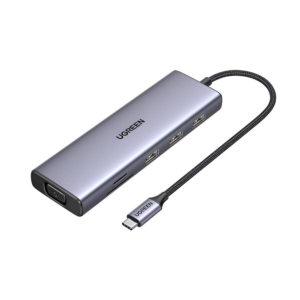
The UGREEN CM639 triple display dock expands a single USB-C port into eight connections — two 4K HDMI outputs, a 4K DisplayPort, dual USB-C 3.2 Gen 2 data ports, dual USB-A 3.2 Gen 2 ports, and 100W pass-through charging — enabling dual or triple external monitor configurations from one cable. It targets Windows power users, creative professionals, and developers who need high-resolution multi-screen setups without a bulky docking station. Additionally, the aluminium build and integrated cable make it compact enough for desk use or portability between locations.
Technical Specifications
Connectivity
| Port | Specification |
|---|---|
| Host Input | 1× USB-C Male (connects to host device) |
| HDMI 1 | 4K@60Hz HDR; 4K@30Hz in triple-display mode |
| HDMI 2 | 4K@60Hz HDR; 4K@30Hz in triple-display mode |
| DisplayPort | 4K@60Hz HDR; 4K@30Hz in triple-display mode |
| USB-C Data (×2) | USB 3.2 Gen 2 — 10 Gbps each; data only; no video or charging |
| USB-A Data (×2) | USB 3.2 Gen 2 — 10 Gbps each |
| USB-C PD | Up to 100W input / 85W pass-through; PD 3.0; charging only |
Video Output — Display Mode Matrix
| Configuration | Resolution & Refresh Rate | Notes |
|---|---|---|
| Single HDMI or DP | 4K@60Hz HDR | Any one port |
| Dual HDMI (HDMI 1 + HDMI 2) | 4K@60Hz | Windows extended or mirror |
| HDMI + DP (any combination) | 4K@60Hz | Windows extended or mirror |
| Triple (HDMI 1 + HDMI 2 + DP) | 4K@30Hz | Windows MST only |
| macOS (any multi-monitor) | 4K@60Hz mirror only | macOS SST limitation; no extended mode |
Power
| Parameter | Value |
|---|---|
| PD Input | Up to 100W |
| PD Pass-Through | Up to 85W (15W reserved for hub) |
| PD Standard | USB PD 3.0 |
Physical
| Parameter | Value |
|---|---|
| Model | CM639 / SKU 35625 |
| Housing | Aluminium alloy |
| Colour | Space Grey |
| Cable | Integrated USB-C pigtail |
Compatibility
| Platform | Multi-Monitor Support |
|---|---|
| Windows 10 / 11 | Triple extended display via MST |
| macOS (all versions) | Mirror mode only for multi-monitor |
| Linux | Single display; multi-monitor support varies by distro |
| ChromeOS | Single display recommended |
| Compatible devices | MacBook Pro/Air, Dell XPS, ThinkPad X1, ZenBook, HP Spectre/ProBook, Surface, iPad Pro (USB-C) |
What This Model Does Not Include
| Feature | Status |
|---|---|
| Ethernet / RJ45 | Not included |
| SD / TF Card Reader | Not included |
| Audio / Headphone Jack | Not included |
Use Cases and Applications
Windows Multi-Monitor Workstations
Professionals who use two or three external displays for trading terminals, code editors, design canvases, or data dashboards benefit directly from MST support. On a Windows laptop with DP 1.4 Alt Mode, the CM639 drives all three screens at once — two via HDMI and one via DisplayPort — without requiring a dedicated GPU dock or proprietary docking station. Furthermore, the 10 Gbps USB-A ports accommodate external NVMe drives and peripherals alongside active displays.
Video and Photo Editing Setups
Colour grading and retouching workflows often require a reference monitor alongside an editing interface. The HDMI outputs support HDR, meaning a connected HDR-capable display receives full dynamic range metadata from compatible software. Additionally, 10 Gbps USB-C ports allow direct connection of fast external SSDs for scratch storage, removing the bottleneck of slower USB 3.0 connections during active editing sessions.
MacBook Users — Important Compatibility Note
MacBook users can connect up to two external displays via this hub; however, macOS restricts all multi-monitor configurations to mirror mode only. Consequently, both screens will show identical content. For MacBook users who need independent extended displays, a DisplayLink-based docking station is the appropriate alternative. For single-display output, the CM639 works fully on macOS at up to 4K@60Hz HDR.
Portable Desk Setups and Hot-Desking
The aluminium housing and integrated cable make the CM639 easy to move between desks or carry in a laptop bag. A single USB-C connection establishes the entire workstation — displays, peripherals, and laptop charging — within seconds. This suits hot-desking environments where reconnecting multiple cables individually is impractical.


 No products in the cart.
Reviews
There are no reviews yet.