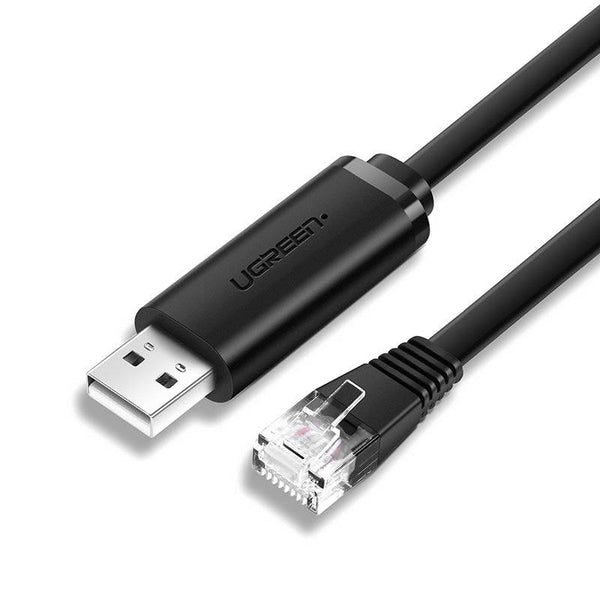
UGREEN USB to RJ45 Console Cable 1.5m (Black)
The UGREEN USB to RJ45 console cable (model CM204, SKU 50773) is a USB 2.0 Type-A to RJ45 serial adapter cable designed for configuring and managing network devices directly from a laptop or desktop. It connects a computer’s USB port to the RJ45 console port of routers, switches, firewalls, and wireless LAN controllers — replacing the legacy RS232 DB-9 or DB-25 serial port adapters that modern laptops no longer carry. A built-in FTDI FT232RL chipset handles USB-to-RS232 signal conversion on-cable, eliminating the need for a separate adapter or external power supply.
What Is a Console Cable and Who Needs One?
A console cable — also called a rollover cable or Cisco cable — provides out-of-band access to network equipment. Unlike SSH or Telnet connections, which travel over the network itself, a console connection works independently of the device’s network configuration. Consequently, it is the standard recovery method when a device has a misconfigured IP address, a locked management interface, or firmware that must be loaded from scratch. Network engineers, IT administrators, and students preparing for CCNA or similar certifications use this type of cable routinely during initial device deployment, troubleshooting, and firmware upgrades.
The CM204 uses a flat cable design with an 8-core twisted-pair internal structure. Each core is individually twisted to suppress electromagnetic interference, which matters in rack environments where the cable runs close to power strips, patch panels, and other cabling. Additionally, the flat profile makes the cable easier to coil and store in a field kit or laptop bag without kinking.
FTDI FT232RL Chipset — Why It Matters
Not all USB-to-serial chipsets are equal. Generic CH340 and CP2102 chips frequently cause driver conflicts on macOS and require manual driver installation on Linux. The FTDI FT232RL is the reference-class chipset for USB-to-serial conversion: drivers ship natively in Windows 8 and later, macOS 9 and later, and mainstream Linux kernels, so the cable registers as a virtual COM port without any driver download on most modern systems. Furthermore, FTDI chips carry a Microsoft HCL certification, which matters in managed enterprise environments where unsigned drivers cannot be installed.
Technical Specifications
Connectors
| Property | Detail |
|---|---|
| Connector 1 | USB 2.0 Type-A Male |
| Connector 2 | RJ45 8P8C Male (Cisco DTE pinout) |
| USB Connector Plating | Nickel-plated (anti-oxidation) |
RJ-45 DTE Pinout
| Pin | Signal |
|---|---|
| 1 | RTS |
| 2 | DTR |
| 3 | TXD |
| 4 | GND |
| 5 | GND |
| 6 | RXD |
| 7 | DSR |
| 8 | CTS |
Performance
| Property | Detail |
|---|---|
| Chipset | FTDI FT232RL |
| USB Standard | USB 2.0 (backward compatible with USB 1.1) |
| Serial Protocol | RS232 |
| Baud Rate | 75 – 115,200 bit/s |
| Maximum Transmission Speed | Up to 1Mbps |
| ESD Protection | 4KV |
| Flow Control | RTS/CTS, DTR/DSR hardware handshaking |
| Remote Wake-Up | Supported |
| Power Management | Supported |
OS Compatibility
| OS | Support |
|---|---|
| Windows | 32-bit and 64-bit; plug-and-play on Windows 8/10/11 |
| macOS | macOS 9 and later; Microsoft HCL certified |
| Linux | Supported (FTDI kernel driver) |
Physical
| Property | Detail |
|---|---|
| Cable Length | 1.5m (4.9 ft) |
| Cable Design | Flat profile, 8-core twisted-pair |
| Colour | Black |
| SKU / Model | CM204 / 50773 |
Use Cases & Applications
Initial Device Configuration and First-Time Setup
New routers and switches ship without an IP address assigned to their management interface. The only way to reach the device for initial configuration is through the console port. The UGREEN CM204 connects directly from a laptop USB port to the device’s RJ45 console port. From there, a terminal emulator such as PuTTY, SecureCRT, or macOS Terminal (using screen) opens a serial session at 9600 baud, 8 data bits, no parity, 1 stop bit — the default for most Cisco-standard devices.
Network Device Recovery and Troubleshooting
When a managed switch or router loses network connectivity — whether from a failed firmware update, misconfigured VLAN, or corrupted startup configuration — SSH and web management interfaces become unreachable. A console connection bypasses the network entirely, providing direct access to the device’s CLI for configuration recovery, password resets, and boot loader operations. Additionally, the 4KV ESD protection on the CM204 reduces the risk of equipment damage when connecting and disconnecting in electrically noisy server rooms.
Field Work and On-Site Network Deployment
Network engineers visiting customer sites carry a console cable as a standard tool alongside a laptop and patch cables. The CM204’s flat profile and 1.5m length make it compact enough to sit in a laptop bag side pocket without taking significant space. Furthermore, its multi-brand compatibility covers Cisco, Ubiquiti UniFi, MikroTik, Fortigate, and HP ProCurve — the most common platforms encountered in East African enterprise and ISP deployments — without needing separate cables for different vendors.
CCNA and Networking Lab Environments
Students building home labs with Cisco Packet Tracer hardware or GNS3 physical devices need a console cable to configure routers and switches. The FTDI chipset’s native Windows and macOS driver support means the cable works immediately on a student’s personal laptop without administrative privileges or third-party driver packages — a practical advantage in shared university lab environments.





 No products in the cart.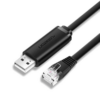
Reviews
There are no reviews yet.