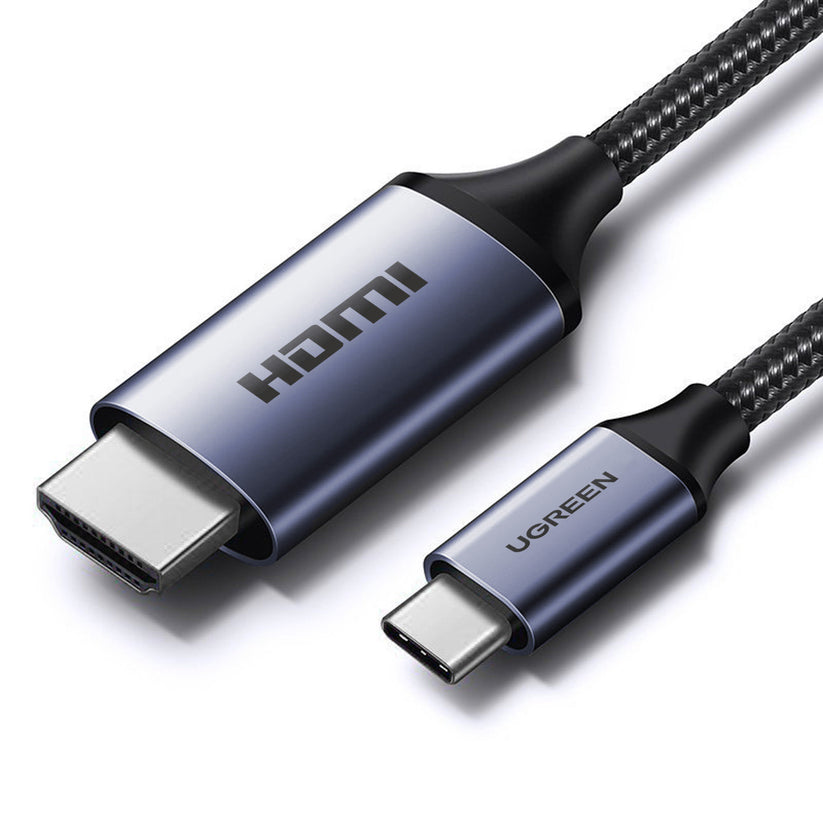
UGREEN USB-C to HDMI 8K Cable – CM565
The UGREEN CM565 is a 1.5-metre USB-C to HDMI cable engineered for users who need full-bandwidth, uncompressed video output from a USB-C device to any HDMI 2.1 display. It targets content creators, gamers, and office professionals who connect laptops, tablets, or smartphones to external monitors, televisions, or projectors. Because it operates via DisplayPort Alternate Mode, it carries both video and audio over a single cable without requiring a separate adapter or hub.
Why This Cable Exists
Many USB-C users discover that generic or older HDMI cables cap output at 4K@30Hz or 4K@60Hz — well below the refresh rates demanded by modern gaming monitors and 8K televisions. The CM565 addresses this by implementing the HDMI 2.1 standard, which raises the ceiling to 8K@60Hz and 4K@120Hz. Additionally, it passes HDR metadata, so colour-grading on a compatible display reflects the original content accurately rather than being flattened.
What Requires Attention Before Buying
This cable is unidirectional: signal flows from USB-C to HDMI only. Furthermore, the source device must support DisplayPort 1.4 Alternate Mode — a requirement that most premium laptops and tablets meet but that some USB-C ports (particularly on budget Android devices and older iPad models) do not. Confirm your device’s USB-C port specification before ordering. The cable does not support HDMI input to USB-C output.
Technical Specifications
Signal and Display
| Parameter | Value |
|---|---|
| HDMI Standard | HDMI 2.1 |
| Maximum Resolution | 8K (7680 × 4320) @ 60 Hz |
| Backward-Compatible Resolutions | 4K@120Hz, 4K@60Hz, 2K@144Hz, 1080p@240Hz |
| HDR Support | HDR10, Dynamic HDR |
| HDCP Version | HDCP 1.4 / 2.3 |
| 3D Support | Yes |
| Audio Pass-Through | Yes (uncompressed, synchronised) |
Connectivity
| Parameter | Value |
|---|---|
| Connector A | USB-C (male) |
| Connector B | HDMI Type-A (male) |
| Signal Direction | Unidirectional (USB-C source → HDMI display) |
| Required Source Standard | DisplayPort 1.4 Alternate Mode or higher |
| Thunderbolt Compatibility | Thunderbolt 3 / 4 ports (DP 1.4 path) |
| Display Modes | Mirror and Extended |
| Samsung DeX / Huawei PC Mode | Supported |
Construction
| Parameter | Value |
|---|---|
| Cable Length | 1.5 metres |
| Core Material | Tin-plated (tinned) copper |
| Shielding | Multiple interior shielding layers (braid) |
| Connector Plating | Gold-plated |
| Colour | Grey |
| Driver Requirement | None — plug and play |
Certifications
| Standard | Status |
|---|---|
| CE | Certified |
| FCC | Certified |
| HDCP 2.3 | Compliant |
Use Cases and Applications
Connecting a Laptop to an 8K or 4K High-Refresh Display
Users with a MacBook Pro (M-series), Dell XPS, Lenovo ThinkPad, HP Spectre, or Samsung Galaxy Book connect the CM565 directly from their USB-C port to an HDMI 2.1 television or monitor. This avoids the latency and compression artefacts associated with wireless casting protocols such as Miracast or AirPlay. The cable carries audio simultaneously, so a single connection replaces both an HDMI cable and a separate audio run.
High-Refresh Gaming via USB-C
A Steam Deck, for example, outputs via USB-C in DisplayPort Alternate Mode. The CM565 allows users to route that signal to an HDMI-equipped television at 4K@120Hz — a meaningful improvement over the 60Hz ceiling of an older cable. Similarly, Android smartphones and tablets with DP Alt Mode support can output game content directly to a large display, bypassing the latency introduced by a capture card or streaming dongle.
Conference Room Presentations
Office users often encounter conference room displays with HDMI inputs and no USB-C pass-through. The CM565 provides a direct cable path from a laptop to the room display. Because it supports extended mode alongside mirror mode, presenters can keep private notes on their laptop screen while the HDMI output shows only the presentation.
Content Creation and Colour-Critical Work
Video editors and photographers who work with HDR10 or Dynamic HDR content benefit from the cable’s ability to pass HDR metadata to a calibrated HDMI 2.1 monitor. The uncompressed signal path means that colour decisions made in the editing application reach the display without intermediate processing that could shift luminance or saturation values.






 No products in the cart.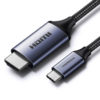
Reviews
There are no reviews yet.