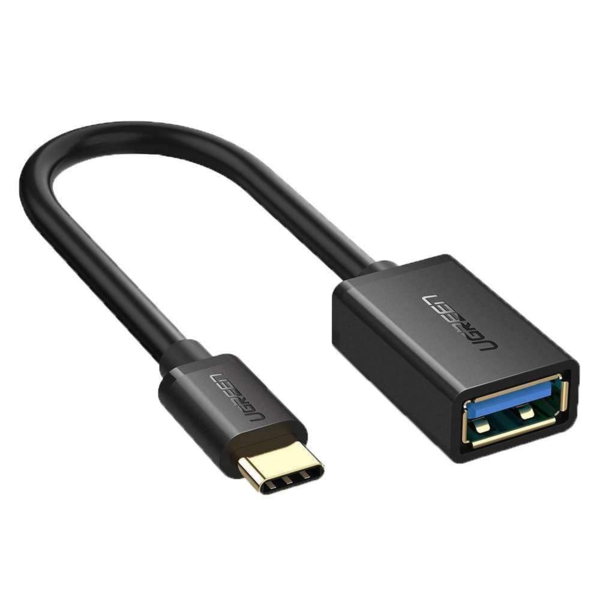
GREEN US154 USB-C to USB-A OTG Cable – 15cm (Black)
The UGREEN US154 is a compact OTG (On-The-Go) adapter cable with a USB-C male connector on one end and a USB-A 3.0 female port on the other. It adds a standard USB-A port to any USB-C device that supports OTG, allowing users to connect USB-A flash drives, keyboards, mice, and game controllers without a hub. Consequently, it suits MacBook users, USB-C smartphone owners, and tablet users who need occasional access to USB-A peripherals in a minimal, pocketable form.
Technical Specifications
Cable & Connectors
| Specification | Detail |
|---|---|
| Model | UGREEN US154 (30701) |
| Connector – End 1 | USB-C 3.1 Gen 1 Male |
| Connector – End 2 | USB-A 3.0 Female |
| Cable Length | 15cm |
| Colour | Black |
| Casing Material | ABS plastic |
Performance
| Specification | Detail |
|---|---|
| USB Standard | USB 3.1 Gen 1 (USB 3.0) |
| Data Transfer Speed | Up to 5Gbps |
| OTG Support | Yes |
| Charging Support | Not recommended |
Construction
| Specification | Detail |
|---|---|
| Wire Core | Tinned (tin-plated) copper |
| Shielding | Multiple internal shielding layers |
| Bend Durability | Tested to 15,000+ bend cycles |
Use Cases & Applications
Connecting USB-A Flash Drives to USB-C Laptops
MacBook Pro, MacBook Air, iPad Pro, and other USB-C-only devices lack a native USB-A port. The US154 provides a direct, low-profile solution without the bulk of a full hub. Plugging a USB-A flash drive into the female end allows immediate file access at up to 5Gbps — fast enough for HD video playback directly from the drive. This is particularly useful for photographers and video editors who regularly move files between a camera card reader and a laptop.
Using USB-A Peripherals with OTG-Enabled Smartphones
Android smartphones with OTG support can connect a USB-A keyboard, mouse, or game controller via the US154. For instance, a Samsung Galaxy or Google Pixel device paired with a full-sized USB keyboard becomes a practical text input workstation. Similarly, connecting a USB-A game controller via OTG extends gameplay options without Bluetooth pairing. Before purchasing, users should confirm their specific device supports OTG function, as not all Android phones enable it by default.
Reading External Storage on Tablets
USB-C tablets — including iPad Pro and Samsung Galaxy Tab models — work with the US154 to access USB-A thumb drives and card readers for media playback or file management. Furthermore, the short cable format means the attached drive sits flush alongside the tablet rather than protruding awkwardly. When connecting external hard drives on a smartphone, however, it is advisable to use a powered USB-A hub, as smartphones may not supply sufficient bus power for spinning-disk drives.
Important Notes
- Charging: This cable is designed for data transfer. UGREEN does not recommend using it for charging.
- OTG requirement: Phones and tablets must support OTG function. Verify this in device settings or manufacturer documentation before purchase.
- External hard drives on smartphones: A powered hub is recommended, as bus power from a phone’s USB-C port may be insufficient for bus-powered HDDs.
Compatible Devices Include
MacBook Pro (2017–present) · MacBook Air (2018–present) · iPad Pro (USB-C models) · Samsung Galaxy S8 through S25 series · Samsung Note 8 through Note 20 series · Google Pixel 2 through 8 series · Huawei P20, P30, P40, Mate 10, Mate 20, Mate 30 · LG G5, G6, V20, V30, V40 · Sony Xperia XZ series · Dell XPS 13/15 · Lenovo Yoga 900 · Surface Book 2, Surface Go 2 · Moto G7, G8 series




 No products in the cart.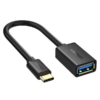
Reviews
There are no reviews yet.