
Lenovo ThinkVision S24i-30 Monitor 23.8″ FHD (63DEKAT3UK)
The Lenovo ThinkVision S24i-30 Monitor is a 23.8-inch Full HD display aimed at daily office work. It combines an IPS panel with a 100Hz refresh rate, so text stays crisp and scrolling stays smooth. Additionally, it adds a 3.5mm audio-out port alongside HDMI and VGA, which lets you route sound to desk speakers or a headset without a separate cable run from your PC.
Lenovo ThinkVision S24i-30 Monitor Technical Specifications
Display
- Screen size: 23.8 inches, flat panel
- Panel type: 3-side NearEdgeless In-Plane Switching (IPS), WLED backlight
- Resolution: 1920 x 1080 (Full HD), 16:9 aspect ratio
- Pixel pitch: 0.275 x 0.275 mm (93 dpi)
- Active area: 527.0 x 296.5 mm
- Surface treatment: Anti-glare
Performance
- Brightness: 250 cd/m² typical
- Contrast ratio: 1300:1
- Viewing angles: 178° horizontal, 178° vertical
- Response time: 4ms in Extreme mode, 6ms in Normal mode
- Refresh rate: 100Hz (over HDMI)
- Colour: 99% sRGB gamut, 16.7 million colours, 8-bit (6-bit + FRC)
- Operating system support: Windows 11 and Windows 10
Connectivity
- 1x HDMI 1.4, supports 1920 x 1080 at 100Hz
- 1x VGA
- 1x audio-out (3.5mm)
- No USB hub, DisplayPort, USB-C, built-in speakers or webcam
Design and Mechanical
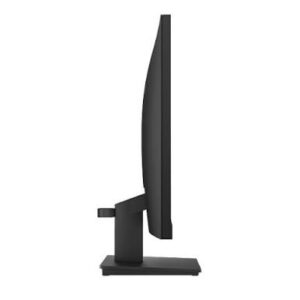
- Bezel width: 2.0mm sides, 2mm top, 22mm bottom
- Panel thickness at slimmest point: 6.9 mm
- Stand adjustment: tilt only, -5° to +22°
- Dimensions with stand: 539.4 x 183.0 x 434.0 mm (21.24 x 7.20 x 17.09 in)
- Dimensions, head only: 539.4 x 43.0 x 326.2 mm
- Weight: 3.8 kg with stand, 3.0 kg head only
- Mounting: VESA 100 x 100 mm; supports ThinkCentre M Series Tiny and Nano with separate mount kits
- Security: Kensington Security Slot (2.5 x 6 mm)
- Cable management: supported
Power and Environment
- Power consumption: 13.5W typical, 20.5W maximum; under 0.5W in sleep
- ENERGY STAR power on: 12.9W; annual TEC 40.5 kWh
- Power supply: internal, AC 100–240V (50–60Hz)
- Operating temperature: 0°C to 40°C
- Operating humidity: 10% to 80%, non-condensing
In the Box
- Monitor with stand
- 1x HDMI cable (1.8m)
- 1x power cable (1.8m)
- Quick setup guide
Certifications and Warranty
- ENERGY STAR certified, EPEAT Gold registered, RoHS compliant, TCO Certified 9.0, TCO edge 2.0, EU Energy Label class E
- Eyesafe Certified 2.0, TÜV Rheinland Eye Comfort, TÜV Rheinland Low Blue Light (hardware solution)
- 3-year limited warranty
Who Should Buy the Lenovo ThinkVision S24i-30 Monitor
This screen suits offices rolling out a standard desk setup across finance, admin, and customer service teams. The audio-out port helps in call centres and meeting rooms, because headsets and desk speakers connect directly. Meanwhile, schools and training labs benefit from the VGA input, since many lab PCs still lack HDMI. Home office users get a low-power screen that runs quietly at 13.5W typical draw.
How it differs from the ThinkVision S24-4e: Both are 23.8-inch Full HD IPS panels running 100Hz over HDMI, so image quality is closely matched. However, the S24i-30 adds the 3.5mm audio-out port, draws less power, and carries TCO 9.0 and Eyesafe certification. It also mounts ThinkCentre Tiny and Nano units behind the panel with an optional kit. Consequently, choose the S24i-30 for corporate rollouts and tender specs, and the S24-4e where budget matters more than certification.
Will it work with my computer? Any desktop or laptop with an HDMI or VGA output will drive it. For instance, ThinkPad, HP, Dell, and assembled desktops all connect without adapters. Neither port carries power, so laptops still need their own charger.
Lenovo ThinkVision S24i-30 Monitor FAQs
Does it have built-in speakers?
No. The panel has no speakers or microphone. However, the 3.5mm audio-out port lets you connect powered speakers or headphones directly to the monitor.
Can I adjust the height?
No. The stand supports tilt only, from -5° to +22°. For height, swivel, or pivot adjustment, mount it on a VESA 100 x 100 mm arm instead.
How do I get the full 100Hz refresh rate?
Connect over HDMI, then select 100Hz in your display settings. VGA is analogue and will typically cap lower, so use HDMI wherever the source device supports it.




 No products in the cart.
Reviews
There are no reviews yet.