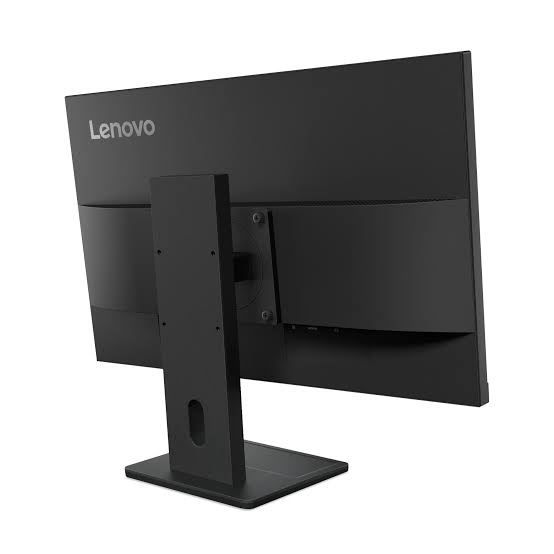
Lenovo ThinkVision E24-40 Monitor 23.8″ FHD (64BAMAT1UK)
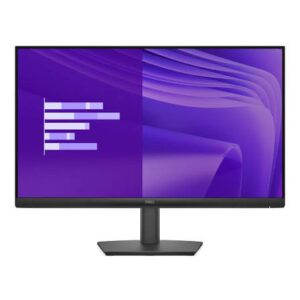
The Lenovo ThinkVision E24-40 Monitor is a 23.8-inch Full HD business display with a fully adjustable stand. It lifts, swivels, tilts, and pivots to portrait, so you can set the screen to match your posture rather than the other way round. Additionally, it carries DisplayPort, HDMI, and VGA inputs plus built-in stereo speakers, which makes it a practical single-cable choice for shared desks and hot-desking setups.
Lenovo ThinkVision E24-40 Monitor Technical Specifications
Display
- Screen size: 23.8 inches, flat panel
- Panel type: 3-side NearEdgeless In-Plane Switching (IPS), WLED backlight
- Resolution: 1920 x 1080 (Full HD), 16:9 aspect ratio
- Pixel pitch: 0.2745 x 0.2745 mm (92 dpi)
- Active area: 527.0 x 296.5 mm
- Surface treatment: Anti-glare
Performance
- Brightness: 250 cd/m²
- Contrast ratio: 1300:1 (3,000,000:1 dynamic)
- Viewing angles: 178° horizontal, 178° vertical
- Response time: 4ms GtG in Extreme mode, 6ms GtG in Normal mode
- Refresh rate: 100Hz (over HDMI)
- Colour: 99% sRGB coverage (CIE 1931), 16.7 million colours, 8-bit (6-bit + FRC)
- Operating system support: Windows 11 and Windows 10
Connectivity and Audio
- 1x HDMI 1.4, supports 1920 x 1080 at 100Hz
- 1x DisplayPort 1.2
- 1x VGA
- Integrated speakers: 2W x 2
- No USB hub, USB-C or webcam
Design and Mechanical
- Bezel width: 2.0mm sides, 2.0mm top, 21.4mm bottom
- Case colour: Raven Black
- Stand adjustment: -5° to +22° tilt, 360° swivel, -90° to +90° pivot, up to 155mm lift
- Dimensions at lowest position: 539.8 x 178.6 x 343.4 mm (21.25 x 7.03 x 13.52 in)
- Dimensions at highest position: 539.8 x 178.6 x 498.4 mm (21.25 x 7.03 x 19.62 in)
- Dimensions, head only: 539.8 x 44.0 x 325.7 mm
- Weight: 4.5 kg with stand, 2.9 kg head only
- Mounting: VESA 100 x 100 mm; ThinkCentre Tiny support with optional VESA mount (PN 4XF0N03161)
- Security: Kensington Nano Security Slot (2.5 x 6 mm)
- Cable management: supported
Power and Environment
- Power consumption: 13W typical, 24W maximum; under 0.5W in sleep
- ENERGY STAR power on: 11.8W; annual TEC 37.9 kWh
- Power supply: internal, AC 100–240V (50–60Hz)
- Operating temperature: 0°C to 40°C
- Operating humidity: 10% to 80%, non-condensing
In the Box
- Monitor with stand
- 1x HDMI 1.4 cable (1.8m)
- 1x power cable (1.8m)
- 4x screws
- Quick setup guide
Certifications and Warranty
- ENERGY STAR certified, EPEAT Gold registered, RoHS compliant, TCO Certified generation 10, TCO Edge 2.1, EU Energy Label class C
- TÜV Rheinland Flicker Free, TÜV Rheinland Low Blue Light (hardware solution)
- 3-year limited warranty
Who Should Buy the Lenovo ThinkVision E24-40 Monitor
This model fits offices that care about ergonomics as much as image quality. Height adjustment matters where staff share desks across shifts, because each person can reset the screen in seconds. Developers, accountants, and legal teams also benefit from the pivot function, since portrait mode shows far more of a long document or code file at once. Meanwhile, IT departments get DisplayPort for newer workstations and VGA for legacy machines still in service.
How it compares to the S24-4e and S24i-30: All three share the same 23.8-inch Full HD IPS panel at 100Hz, so picture quality is broadly similar. However, the S24-4e and S24i-30 both use tilt-only stands with HDMI and VGA. The E24-40 adds DisplayPort 1.2, built-in speakers, and the full lift, swivel, and pivot stand. It is also the only one of the three carrying a C-class EU energy rating. As a result, pick the E24-40 for staffed workstations and ergonomic compliance, the S24i-30 for certified corporate rollouts on a tilt stand, and the S24-4e where budget leads.
Will it work with my computer? Yes, in almost every case. Modern laptops connect over HDMI or DisplayPort, while older desktops use VGA. However, none of these ports supply power, so a laptop still needs its own charger.
Lenovo ThinkVision E24-40 Monitor FAQs
Does it have built-in speakers?
Yes. Two 2W speakers are integrated into the panel. Audio travels over the HDMI or DisplayPort connection, so a VGA-only setup will not carry sound to the monitor.
Can I rotate the screen to portrait mode?
Yes. The stand pivots from -90° to +90°, so the panel turns fully into portrait orientation. Additionally, it lifts up to 155mm and swivels a full 360°.
How do I get the full 100Hz refresh rate?
Connect over HDMI and select 100Hz in your display settings. VGA is analogue and will typically cap lower, so use a digital input where your device supports one.





 No products in the cart.
Reviews
There are no reviews yet.