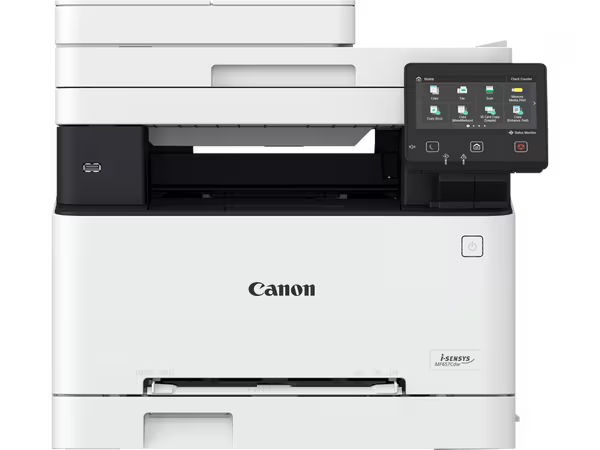
Canon i-SENSYS MF655CDW A4 Colour Laser Multifunction Printer
The Canon i-SENSYS MF655CDW is a wireless A4 colour laser multifunction printer designed for small to medium-sized workgroups that need reliable, fast colour output alongside copy and scan capabilities. It targets office environments where document security, cloud connectivity, and print throughput all matter. Additionally, teams that share a single device across multiple users will benefit from its Department ID Management and secure PIN print features.
Technical Specifications
Print Performance
| Specification | Detail |
|---|---|
| Print Technology | Colour laser electrophotographic |
| Print Speed (Mono & Colour, A4) | Up to 21 ppm single-sided; up to 12.7 ipm double-sided |
| Print Speed (A5 Landscape) | Up to 38 ppm |
| Print Resolution | Up to 1200 × 1200 dpi |
| First Print Out Time | Approx. 7.7 seconds (mono); approx. 8.7 seconds (colour) |
| Monthly Duty Cycle | Up to 30,000 pages |
| Printing Method | Automatic duplex |
Copy Performance
| Specification | Detail |
|---|---|
| Copy Speed (Mono, A4) | Up to 21 cpm |
| Copy Speed (Colour, A4) | Up to 21 cpm |
| Copy Resolution | Up to 600 × 600 dpi |
| Zoom Range | 25% – 400% |
| Multiple Copies | Up to 999 copies |
Scan Performance
| Specification | Detail |
|---|---|
| Scanner Type | Single-pass duplex ADF + flatbed platen |
| ADF Scan Speed (A4 Colour) | Approx. 13.4 seconds or less |
| ADF Scan Speed (A4 Mono) | Approx. 11.4 seconds or less |
| Platen Scan Speed (A4 Colour) | Approx. 14.5 seconds or less |
| Platen Scan Speed (A4 Mono) | Approx. 12.3 seconds or less |
| Optical Resolution | 600 × 600 dpi |
| Scan Output | File (FTP, SMB 3.0), Email/I-Fax (SMTP/POP3), Pull Scan (TCP/IP) |
Paper Handling
| Specification | Detail |
|---|---|
| Standard Cassette Capacity | 250 sheets |
| Multi-Purpose Tray Capacity | 50 sheets |
| Total Input Capacity | 300 sheets |
| ADF Capacity | Up to 50 sheets |
| Supported Sizes (Cassette) | A4, A5, A5 Landscape, B5, Legal, Letter, Executive, Statement, OFFICIO, Foolscap, 16K, Postcard, Index Card, Envelopes (COM10, DL, C5, Monarch); custom: 76.2 × 127 mm – 216 × 355.6 mm |
| Supported Media | Plain, Recycled, Heavy, Thin, Colour, Coated, Label, Postcard, Envelope |
| Display | 12.7 cm colour touchscreen |
Connectivity
| Specification | Detail |
|---|---|
| Wired Network | Ethernet (10Base-T / 100Base-TX / 1000Base-T) |
| Wireless | Wi-Fi 802.11b/g/n, Wireless Direct |
| Wireless Security | WEP 64/128-bit, WPA-PSK (TKIP/AES), WPA2-PSK (TKIP/AES) |
| Mobile Printing | Apple AirPrint, Mopria (Android), Canon PRINT Business app |
| Cloud Printing | Dropbox, Google Drive, OneDrive (PDF/JPEG) |
| USB | USB Hi-Speed (Type A host for memory key; Type B device) |
| Network Protocols | LPD, Port9100, IPP/IPPS, WSD, SNMPv1, SNMPv3 (IPv4/IPv6) |
| Security Protocols | TLS 1.3, IPSec, IEEE 802.1X, SSL (HTTPS, IPPS) |
Physical
| Specification | Detail |
|---|---|
| Dimensions (W × D × H) | Approx. 469 × 469 × 469 mm |
| Weight | Approx. 22.6 kg |
| Power Consumption (Active) | Approx. 850 W maximum |
| Operating Systems | Windows 7 SP1 and later, macOS, Chrome OS |
Use Cases & Applications
Shared Office Workgroups
The Canon i-SENSYS MF655CDW suits teams of three to ten users who share a single print and scan device. The 300-sheet combined paper capacity, 21 ppm throughput, and 30,000-page monthly duty cycle handle steady daily volumes without frequent intervention. Department ID Management lets administrators track usage per team or cost centre, which is useful for internal billing.
Document-Intensive Workflows
Offices that process multi-page reports, contracts, or client files benefit from the single-pass duplex ADF. Scanning a 50-page double-sided document to a shared SMB folder or directly to email takes under two minutes. Furthermore, the Application Library enables custom scan-to-workflow shortcuts on the touchscreen, removing repetitive steps from daily routines.
Secure Print Environments
For organisations handling confidential documents — legal firms, HR departments, finance teams — Secure Print holds jobs in the queue until the user enters their PIN at the device. This prevents documents from sitting uncollected in the output tray. IPSec and TLS 1.3 additionally protect data in transit across the network.



 No products in the cart.
Reviews
There are no reviews yet.