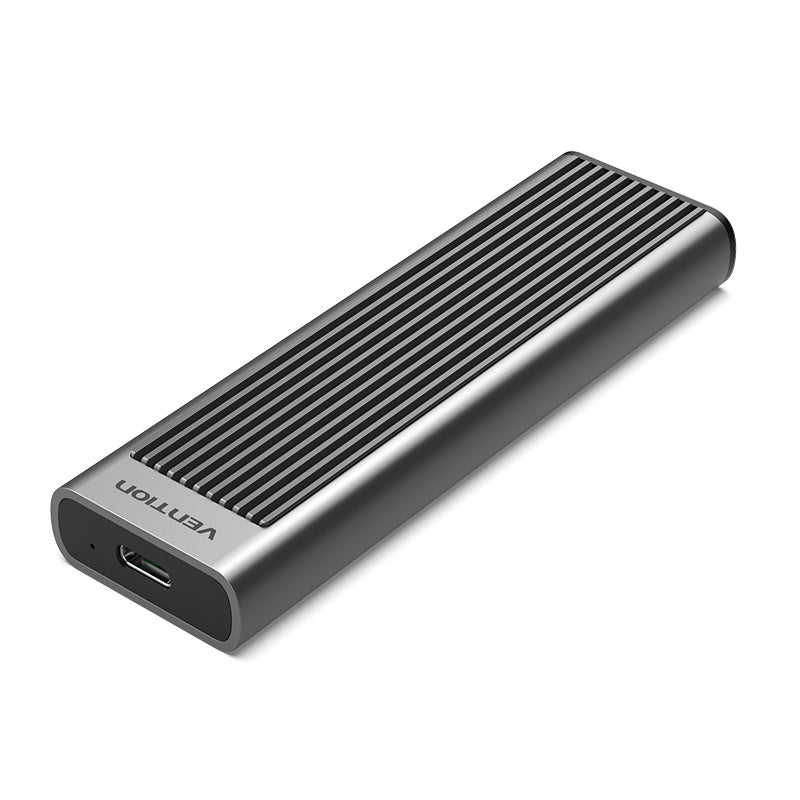
Vention M.2 NVMe SSD Enclosure (KPGH0)
The Vention M.2 NVMe SSD Enclosure transforms high-speed NVMe solid-state drives into portable external storage with USB 3.1 Gen 2 Type-C connectivity. This aluminum enclosure supports M.2 NVMe SSDs in 2230, 2242, 2260, and 2280 form factors for maximum compatibility. The USB-C interface delivers up to 10Gbps transfer speeds that fully utilize NVMe performance capabilities. Content creators, IT professionals, and power users will appreciate the tool-free installation that enables rapid drive deployment. The compact design provides superior thermal management while maintaining true pocket portability for mobile workflows.
NVMe Enclosure Technical Specifications
Drive Compatibility
- Supported Interface: M.2 NVMe PCIe SSDs (PCIe 3.0 and 4.0)
- Form Factors: 2230, 2242, 2260, 2280 (22mm width)
- Key Type: M-Key and B+M Key configurations
- Capacity Support: Up to 2TB (dependent on drive specifications)
- Compatible Brands: Samsung, Western Digital, Crucial, Kingston, Sabrent, SK Hynix, Intel, Corsair
- Not Compatible: M.2 SATA SSDs (SATA protocol not supported)
USB Interface Specifications
- USB Type: USB 3.1 Gen 2 Type-C
- Transfer Speed: Up to 10Gbps (1250MB/s theoretical maximum)
- Actual Performance: Up to 1000MB/s with high-performance NVMe drives
- Backward Compatibility: USB 3.0 (5Gbps), USB 2.0 (480Mbps)
- Cable Included: USB-C to USB-C cable (approximately 30cm)
- Cable Type: USB 3.1 Gen 2 certified supporting full 10Gbps bandwidth
- Connector: Reversible USB Type-C on both ends
Physical Design
- Dimensions: Approximately 108mm × 30mm × 10mm
- Weight: Approximately 35-45g (without drive)
- Housing Material: Aluminum alloy with sandblasted anodized finish
- Color: Space gray metallic
- Heat Dissipation: Full aluminum body with integrated thermal pad
- LED Indicator: Blue LED displaying power and data activity status
- Portability: Ultra-compact pocket-sized form factor
Performance Specifications
- Maximum Transfer Rate: 10Gbps USB 3.1 Gen 2
- Sequential Read: Up to 1000MB/s (limited by USB interface)
- Sequential Write: Up to 1000MB/s (limited by USB interface)
- UASP Support: USB Attached SCSI Protocol for enhanced performance
- TRIM Support: Enabled for SSD longevity and performance optimization
- S.M.A.R.T. Support: Drive health monitoring through system utilities
- PCIe Generation: Supports PCIe 3.0 x4 and 4.0 drives (limited to USB bandwidth)
Power Specifications
- Power Source: USB bus-powered (no external adapter required)
- Power Consumption: 3.5W maximum during operation
- Sleep Mode: Automatic sleep after configurable inactivity period
- Power LED: Indicates power status and drive activity
Operating System Compatibility
- Windows: Windows 11/10/8.1/8/7 (64-bit recommended)
- macOS: macOS 10.13 High Sierra and later (including Sonoma)
- Linux: Ubuntu 16.04+, Fedora, Debian, and major distributions
- Chrome OS: Compatible with Chromebooks supporting USB-C
- iPadOS: iPad Pro with USB-C (file transfer and storage expansion)
- Android: Android 9.0+ devices with USB-C OTG support
Data Protection Features
- Hot-Swap Support: Safe connection and removal without system restart
- Overcurrent Protection: Protects drive and host system from electrical surges
- Short Circuit Protection: Automatic shutdown during electrical faults
- ESD Protection: Electrostatic discharge protection up to 15KV
- Thermal Protection: Prevents overheating through passive cooling design
File System Support
- Windows: NTFS, exFAT, FAT32
- macOS: APFS, HFS+, exFAT, FAT32
- Linux: ext4, ext3, ext2, exFAT, FAT32
- Universal Compatibility: exFAT recommended for cross-platform use
Installation Components
- Thermal Pad: Pre-installed silicone thermal interface material
- Drive Spacers: Adjustable mounting clips for different drive lengths
- Cable: USB-C to USB-C cable included
- Manual: Quick installation guide with illustrations
Professional NVMe Storage Applications
Video Production and Editing
Video editors maintain portable storage for 4K and 8K footage with NVMe-speed access anywhere. The Vention M.2 NVMe enclosure delivers sustained 1000MB/s speeds for smooth timeline scrubbing and real-time playback. Transfer hours of raw 4K footage from cameras to editing workstations in minutes instead of hours. Move between editing suites carrying project drives with complete media libraries in compact form factors. The aluminum construction prevents thermal throttling during intensive rendering and export operations.
Photography Workflow Management
Professional photographers streamline field-to-studio workflows with high-capacity portable NVMe storage. Import thousands of RAW files directly from memory cards to external NVMe drives during on-location shoots. Access and edit large photo libraries with speeds matching internal drives for seamless Lightroom and Photoshop performance. Archive completed projects on portable drives while maintaining instant access when clients request revisions. The pocket-sized design fits in camera bags without occupying precious equipment space.
Software Development and Testing
Developers create portable development environments and boot drives using NVMe performance in external form factors. Boot complete operating systems from external drives for testing software across different platforms. Maintain separate development environments for different clients or projects on swappable drives. Clone production environments to portable drives for troubleshooting and debugging away from servers. The 10Gbps interface provides near-internal drive performance for compilation and build operations.
Data Migration and System Upgrades
IT professionals facilitate laptop upgrades by cloning existing drives to larger NVMe SSDs before installation. Transfer complete system images between computers using high-speed external connectivity. Test suspected failing drives outside their original systems for diagnostic purposes. Recover data from damaged computers by connecting internal drives externally. The tool-free design enables rapid drive swapping when servicing multiple systems daily.
Gaming and Console Expansion
Gamers expand PlayStation 5 and Xbox Series X|S storage using high-performance external NVMe drives. Install and play compatible games directly from external NVMe storage with minimal performance impact. Maintain separate game libraries for different family members or game categories on swappable drives. Transport extensive game collections between locations using pocket-sized portable storage. The superior cooling prevents thermal throttling during extended gaming sessions.
Creative Asset Libraries
Designers and content creators organize massive asset libraries across portable high-speed drives. Access texture libraries, 3D models, stock footage, and audio samples with instant load times. Share large creative files with collaborators by physically transferring encrypted drives. Maintain version control by archiving project iterations on dedicated external drives. The compact size allows carrying multiple project drives to client meetings and presentations.
Mobile Workstation Enhancement
Professionals transform tablets and lightweight laptops into powerful workstations using external NVMe storage. Connect to iPad Pro for direct video editing and file management with near-desktop performance. Expand Chromebook storage for offline work with large datasets and applications. Store virtual machines and development tools externally while keeping primary systems lightweight. The USB-C interface provides universal compatibility across modern mobile devices.
Important NVMe Enclosure Considerations
NVMe vs SATA Compatibility
This enclosure exclusively supports M.2 NVMe drives and will not work with M.2 SATA SSDs. M.2 NVMe drives feature M-Key or B+M Key notches while M.2 SATA drives use B-Key notches. Verify drive specifications list PCIe/NVMe protocol rather than SATA protocol before purchasing. Attempting to install SATA drives will result in no detection as connector configurations differ. Check existing drive labels or system specifications to confirm NVMe interface.
Performance Expectations and Bottlenecks
USB 3.1 Gen 2 limits maximum speeds to approximately 1000MB/s regardless of drive capabilities. High-end PCIe 4.0 NVMe drives capable of 7000MB/s internally throttle to USB interface speeds. The enclosure fully utilizes USB bandwidth but cannot exceed 10Gbps limitation. Actual speeds vary based on file sizes, system configuration, and USB controller quality. Large sequential transfers achieve higher speeds than many small files due to overhead.
Thermal Management Requirements
NVMe drives generate significant heat during sustained operations that can trigger thermal throttling. The included thermal pad transfers heat from drive controller to aluminum enclosure body. Position enclosures with adequate airflow and avoid covering during intensive operations. The enclosure may become warm to touch during large transfers but protects drive from damage. High-performance drives may throttle slightly during extended 30+ minute continuous transfers despite cooling.
Installation Process and Care
Proper installation prevents connection issues and ensures optimal thermal contact. Align drive notches with enclosure keys before sliding into connector to avoid pin damage. Press thermal pad firmly against drive controller chip for maximum heat transfer. Secure drive using appropriate spacer position based on 2230/2242/2260/2280 length. Never force drives into position as this damages delicate PCIe connectors.
Power Delivery Requirements
Some high-performance NVMe drives exceed standard USB bus power capabilities during peak operations. Symptoms include unexpected disconnections, performance drops, or system instability under load. Connect directly to computer USB ports rather than unpowered hubs for adequate current. Use high-quality USB-C cables rated for power delivery when experiencing issues. Some older laptops provide insufficient USB port power for power-hungry NVMe drives.
Operating System Drive Formatting
New or reformatted drives require initialization before use depending on operating system. Windows prompts for initialization and partitioning through Disk Management for new drives. macOS requires Disk Utility to format drives with APFS, HFS+, or exFAT file systems. Linux typically auto-mounts common file systems but may need manual mounting for specific formats. Choose exFAT for maximum cross-platform compatibility between Windows, macOS, and Linux.
Cable Quality Impact
Poor quality or damaged cables drastically reduce transfer speeds and cause connection instability. Use included cable or certified USB 3.1 Gen 2 cables supporting full 10Gbps bandwidth. Generic cables may limit speeds to USB 2.0 (480Mbps) despite capable hardware. Verify cable specifications explicitly state “10Gbps” or “USB 3.1 Gen 2” support. Replace cables showing physical damage, loose connections, or performance degradation immediately.
Drive Form Factor Verification
Confirm physical drive dimensions match supported form factors before purchasing. Measure drive length from connector edge to opposite end: 22mm (width) by 30/42/60/80mm (length). Some ultra-compact devices use non-standard M.2 form factors incompatible with standard enclosures. Enterprise or specialty drives may feature different connector placements or mounting holes. Check manufacturer specifications list standard M.2 2280 or similar designation.
Safe Ejection Procedures
Always eject drives through operating system controls before physical disconnection to prevent data corruption. Windows “Safely Remove Hardware” and macOS “Eject” ensure all write operations complete. Disconnecting during active transfers causes file corruption and potential drive damage. Wait for LED indicator to stop flashing before removing drive from computer. Never remove drives during system boot or shutdown processes.
 No products in the cart.
Reviews
There are no reviews yet.