
UGREEN USB 3.0 to SATA Dual-Bay Hard Drive Duplicator/Cloner EU
The UGREEN dual-bay SATA hard drive duplicator (model CM198, SKU 50857) is a two-bay desktop docking station that connects 2.5-inch and 3.5-inch SATA HDDs and SSDs to a computer via USB 3.0, and clones one drive to another with a single button press — no computer required for the cloning operation. It targets IT technicians, system builders, content creators, and home users who need to migrate data, upgrade storage, or create full disk backups without relying on software or an active PC connection. The EU power adapter included in this variant delivers stable 12V/3A current to power both bays simultaneously, including the higher draw of 3.5-inch desktop drives.
Docking Station and Duplicator in a Single Unit
Most USB hard drive enclosures serve only one purpose: connecting a drive to a computer for file access. The CM198 serves two distinct functions from the same hardware. In docking mode, both bays appear as independent external drives on a connected computer, allowing simultaneous read and write access across two drives — useful for drag-and-drop migrations, RAID-free comparisons, or simply accessing an archive drive alongside an active working drive. In cloning mode, the USB cable disconnects from the computer entirely, and a single button initiates a sector-by-sector copy from the source drive in Bay 1 to the target drive in Bay 2, independently of any host device.
UASP and JMS561U: Why Transfer Speed Matters
Standard USB 3.0 bottlenecks at the protocol level before it reaches the 5Gbps physical ceiling. The CM198 addresses this with UASP (USB Attached SCSI Protocol) support via the JMS561U chipset, which processes commands in parallel rather than sequentially. Additionally, the internal SATA III interface runs at up to 6Gbps between the chipset and the drive, ensuring the external USB connection — not the SATA link — is the limiting factor. UGREEN lab tests show UASP delivers 70% faster read speeds and 40% faster write speeds compared to standard USB 3.0 BOT (Bulk-Only Transport) protocol. Furthermore, the vertical bay orientation promotes passive airflow around inserted drives, reducing thermal throttling during extended transfer or cloning sessions. An auto-sleep function engages after 15 minutes of inactivity, spinning drives down to reduce heat and extend drive lifespan.
Technical Specifications
Connectivity
| Property | Detail |
|---|---|
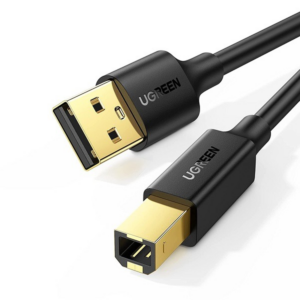
| Host Interface | USB 3.0 (USB-B port on dock) |
| Drive Interface | SATA III (6Gbps) — 2 × 15-pin SATA |
| Chipset | JMS561U |
| Protocol Support | UASP (USB Attached SCSI Protocol) |
| Backward Compatibility | USB 2.0 / USB 1.1 (at lower speeds) |
Performance
| Property | Detail |
|---|---|
| USB Transfer Rate | Up to 5Gbps (USB 3.0) |
| SATA Interface Speed | Up to 6Gbps (SATA III) |
| UASP Read Speed Gain | ~70% faster than standard USB 3.0 BOT |
| UASP Write Speed Gain | ~40% faster than standard USB 3.0 BOT |
| Benchmark (lab) | 1GB file transfer in ~3 seconds |
Drive Compatibility
| Property | Detail |
|---|---|
| Supported Form Factors | 2.5-inch and 3.5-inch SATA HDD/SSD |
| SATA Versions | SATA I, SATA II, SATA III |
| Max Capacity per Bay (2.5″) | 12TB |
| Max Capacity per Bay (3.5″) | 16TB |
| Total Combined Capacity | Up to 28TB |
| Not Supported | NVMe SSDs, IDE/PATA drives |
Cloning
| Property | Detail |
|---|---|
| Clone Mode | Offline — no computer connection required |
| Clone Trigger | One-key button press |
| Clone Type | Sector-by-sector full disk duplication |
| Target Drive Requirement | Equal to or larger than source drive capacity |
| Clone Progress | LED indicator on dock |
Power
| Property | Detail |
|---|---|
| Power Adapter | 12V / 3A (EU plug, included) |
| 2.5″ Drive Power | Bus-powered (adapter optional) |
| 3.5″ Drive Power | Requires external 12V/3A adapter |
Physical
| Property | Detail |
|---|---|
| Housing Material | ABS plastic with aluminium heat-dissipating elements |
| Drive Orientation | Vertical (improved passive cooling) |
| Auto-Sleep | 15 minutes of inactivity |
| LED Indicators | Per-bay: power, drive activity, clone progress |
| Anti-Slip Pads | Yes — base-mounted |
| Dust-Proof Baffles | Yes — bay covers included |
| USB Cable Length | 50cm (included) |
| Dimensions | 220 × 180 × 80 mm |
| Weight | 660g |
| SKU / Model | CM198 / 50857 |
OS Compatibility
| OS | Support |
|---|---|
| Windows | XP, 7, 8, 10, 11 (32-bit and 64-bit) |
| macOS | Mac OS X and later |
| Linux | Supported |
| Other | PS4, PS5, Smart TV, Smart Router (OTG-enabled phones) |
Use Cases & Applications
OS and Data Migration: HDD to SSD Upgrade
Replacing a laptop or desktop hard drive with an SSD is one of the most common performance upgrades. However, reinstalling an operating system from scratch and reconfiguring software takes hours. The CM198 eliminates that process: insert the old HDD in Bay 1 and the new SSD in Bay 2, disconnect the USB cable, and hold the clone button. The dock copies every sector — operating system, applications, settings, and data — to the SSD without involving the host computer. The SSD can then be installed directly in the machine. Note that the target SSD must have equal or greater capacity than the source HDD’s total partition size.
IT Technician Bulk Drive Provisioning
IT administrators deploying multiple identical workstations often need to replicate a configured OS image across many drives. The CM198 handles each drive pair independently and offline, allowing the technician to run a clone on one pair while preparing the next, without monopolising a workstation. Furthermore, compatibility with Windows, macOS, and Linux environments means the dock integrates into mixed-fleet workshops without driver installation or OS-specific tools.
Data Recovery and Forensic Copying
When a drive shows signs of impending failure — bad sectors, clicking heads, or file system errors — a sector-by-sector clone preserves the drive’s complete state on healthy media before the original fails entirely. The CM198’s offline cloning operates independently of the source drive’s file system health; it copies raw sectors rather than mounted files. Consequently, this approach is also used in basic forensic workflows where preserving an unmodified image of the original drive is important.
Home and Small-Office Backup and Archiving
Home users with collections of photos, video projects, or business records on SATA drives can use the dock both as a daily docking station for accessing archive drives and as a backup tool for periodic full-disk duplicates. The auto-sleep function reduces wear on drives left docked but inactive, while the dust-proof bay baffles protect drives seated in unused bays between sessions.



 No products in the cart.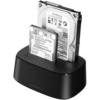
Reviews
There are no reviews yet.