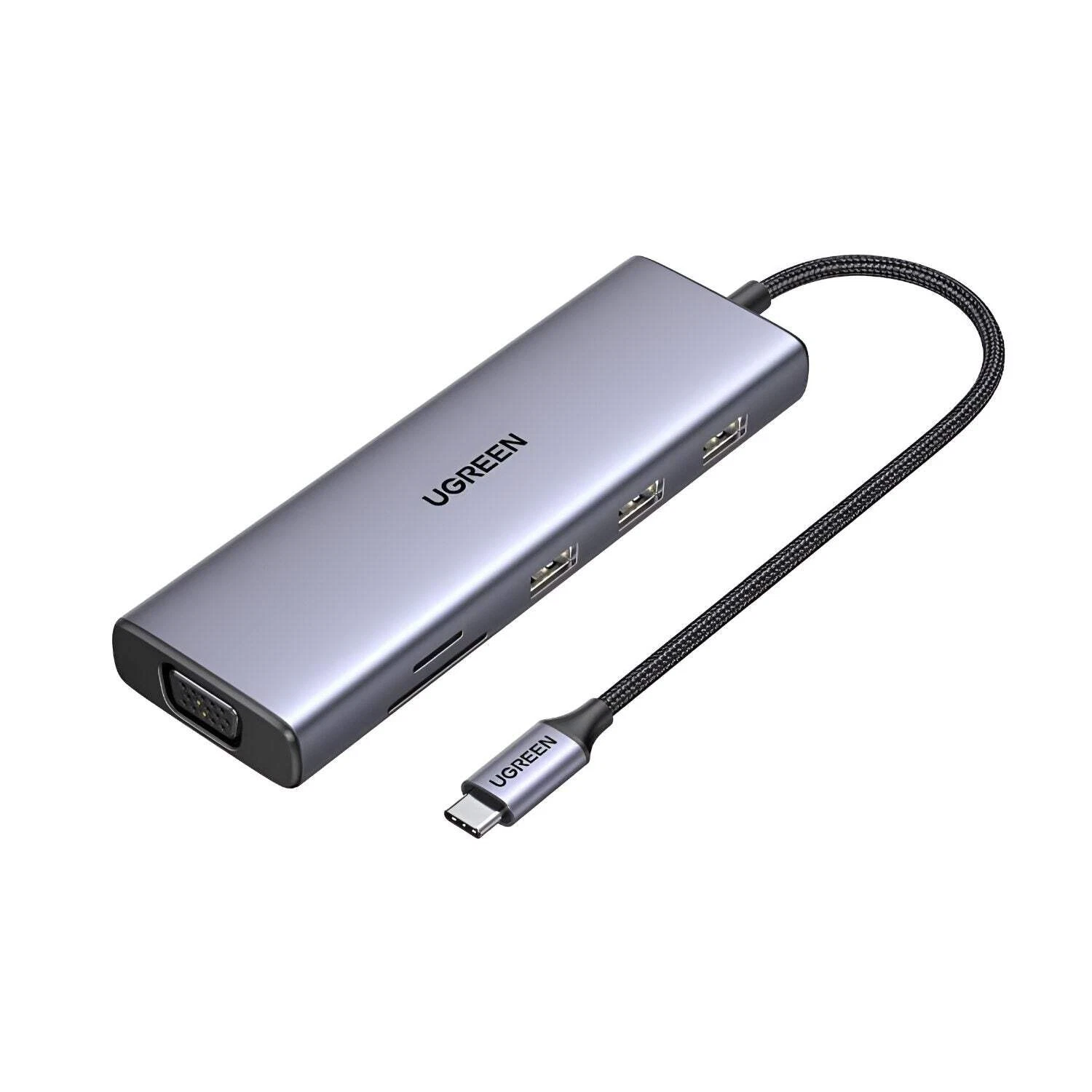
UGREEN Revodok Pro 209 9-in-1 USB-C Docking Station (90912)
The UGREEN Revodok Pro 209 expands a single USB-C port into nine simultaneous connections — two 4K@60Hz HDMI outputs, two 4K@60Hz DisplayPort outputs, dual USB-A 3.2 Gen 2 data ports, a USB-C 3.2 Gen 2 data port, Gigabit Ethernet, and 100W pass-through charging — using DisplayLink technology to deliver fully independent extended dual-monitor support on both Windows and macOS. It targets power users, creative professionals, and remote workers who need two genuinely independent 4K displays from a single laptop USB-C port, with the added flexibility of choosing between HDMI and DisplayPort cables for each monitor. Additionally, the aluminium chassis and dedicated power button make this a desktop-class docking solution rather than a portable hub.
Technical Specifications
Connectivity
| Port | Specification |
|---|---|
| Host Input | 1× USB-C — detachable cable connection to host device |
| HDMI 1 | 4K@60Hz; also 2K@120Hz and 1080p@144Hz |
| HDMI 2 | 4K@60Hz; also 2K@120Hz and 1080p@144Hz |
| DisplayPort 1 | 4K@60Hz; also 2K@120Hz and 1080p@144Hz |
| DisplayPort 2 | 4K@60Hz; also 2K@120Hz and 1080p@144Hz |
| USB-A (×2) | USB 3.2 Gen 2 — 10 Gbps each |
| USB-C Data | USB 3.2 Gen 2 — 10 Gbps; data only — no video, no charging |
| RJ45 Ethernet | 1× Gigabit — auto-negotiation 10/100/1000 Mbps; requires DisplayLink driver |
| USB-C PD | Up to 100W input / 85W pass-through; PD 3.0; charging only |
Video Output — Valid Display Pairings
| Display 1 Port | Display 2 Port | Result |
|---|---|---|
| HDMI 1 | HDMI 2 | Dual 4K@60Hz — valid |
| DP 1 | DP 2 | Dual 4K@60Hz — valid |
| HDMI 1 | DP 2 | Dual 4K@60Hz — valid |
| HDMI 2 | DP 1 | Dual 4K@60Hz — valid |
| HDMI 1 | DP 1 | Invalid — same Display group |
| HDMI 2 | DP 2 | Invalid — same Display group |
Important: All four video ports and the Ethernet port require DisplayLink driver installation before use. HDMI and DP outputs do not support DRM-protected streaming content (Netflix, Disney+, Hulu) due to DisplayLink architecture.
Power
| Parameter | Value |
|---|---|
| PD Input | Up to 100W (PD 3.0) |
| PD Pass-Through | Up to 85W (15W reserved for hub) |
| PD Standard | USB PD 3.0 |
Physical
| Parameter | Value |
|---|---|
| Model | CM615 / SKU 90912 |
| Dimensions | 166 × 80 × 23 mm |
| Weight | 510 g |
| Housing | Aluminium alloy |
| Colour | Space Grey |
| Power Button | Yes — must press to activate after connecting |
| Driver Required | Yes — DisplayLink driver from Synaptics (displaylink.com) |
What This Model Does Not Include
| Feature | Status |
|---|---|
| SD / TF Card Reader | Not included |
| 3.5mm Audio Jack | Not included |
| VGA | Not included |
| DRM streaming (Netflix, Disney+) | Not supported via DisplayLink |
Compatibility
| Platform | Multi-Monitor Support |
|---|---|
| Windows 10 / 11 | Dual extended display via DisplayLink |
| macOS (all versions) | Dual extended display via DisplayLink — driver and DisplayLink Manager required |
| Linux | Limited; DisplayLink support varies by distribution |
| Compatible Devices | MacBook Pro/Air (Intel and Apple Silicon), Dell XPS, ThinkPad X1, ZenBook, HP Spectre, Surface, and most USB-C laptops |
Use Cases and Applications
Dual Extended Display for MacBook Users
MacBook users have historically been limited to mirror mode with standard MST-based docks. The Revodok Pro 209 resolves this using DisplayLink technology — two genuinely independent 4K@60Hz monitors display different content simultaneously on macOS, enabling side-by-side application windows, reference displays, and extended timeline editing without workarounds. Consequently, this dock is one of the few cable-connected solutions that delivers a true dual-extended desktop experience on Apple Silicon Macs.
Professional Windows Workstations
Windows professionals running data-intensive tasks — financial modelling, CAD work, software development, or video post-production — benefit from two independent 4K@60Hz displays alongside 10 Gbps USB ports for fast external NVMe storage. The flexibility to use any combination of HDMI and DisplayPort cables means existing monitor infrastructure works without additional adapters. Furthermore, the Gigabit Ethernet port provides a stable, low-latency wired connection throughout.
Remote and Home Office Setups
A single connection to the Revodok Pro 209 establishes a full workstation — dual displays, wired Ethernet, peripheral connections, and laptop charging — in one step. The power button additionally allows users to disconnect all peripherals at once by switching off the dock without unplugging individual cables, simplifying the transition between desk and mobile use.
Creative and Media Production
Video editors and motion designers who require a reference monitor alongside an editing timeline benefit from two independent extended displays at 4K@60Hz. However, users who need DRM-protected streaming content on an external monitor — such as streaming from Netflix or Disney+ — should note that DisplayLink-connected screens do not support this; the laptop’s built-in display remains fully functional for streaming.





 No products in the cart.
Reviews
There are no reviews yet.