
Logitech MK270 Wireless Keyboard and Mouse Combo
The Logitech MK270 wireless keyboard and mouse combo pairs a full-size keyboard with an integrated number pad alongside a compact ambidextrous optical mouse, connected through a single Logitech Advanced 2.4 GHz nano receiver. It suits home desktops, general office workstations, and any Windows or ChromeOS setup where users want cable-free reliability without sacrificing a complete key layout. Plug the receiver into a USB port and both devices connect immediately — no drivers or software installation required.
Full-Size Keyboard, Cable-Free
The MK270 keyboard retains the complete 103-key US layout including a 10-key number pad, full F-key row, and eight dedicated multimedia hotkeys across the top. This distinguishes it from compact combo alternatives like the MK220, which trade the full-width body for a smaller footprint. Consequently, the MK270 suits users who need frequent numerical input or prefer a traditional full-size typing posture without the restriction of a compressed layout.
Three Years of Keyboard Battery Life
The keyboard runs on 2 × AAA batteries for up to 36 months under typical office use — one of the longer battery intervals in Logitech’s entry-level combo range. A battery level indicator LED on the keyboard provides a low-battery warning before the device stops functioning. An on/off switch on both the keyboard and mouse additionally extends battery life during periods of non-use, such as overnight or across weekends.
Technical Specifications
Connectivity
| Specification | Detail |
|---|---|
| Wireless Protocol | Logitech Advanced 2.4 GHz |
| Wireless Range | Up to 10 m (33 ft) |
| Receiver | Nano USB receiver (included — connects both devices) |
| Bluetooth | No |
| Plug-and-Play | Yes — no drivers required |
Keyboard (K270)
| Specification | Detail |
|---|---|
| Layout | Full-size QWERTY |
| Total Keys | 103 (US layout) |
| Number Pad | Yes — 10-key |
| Function Keys | F1–F12, full-size |
| Multimedia Hotkeys | 8 (internet, email, play/pause, mute, volume up/down, and more) |
| Key Type | Plunger (membrane) |
| Spill Resistance | Tested to 60 ml liquid spillage |
| Tilt Legs | Yes — 0° flat and 8° elevated |
| Backlighting | No |
| On/Off Switch | Yes |
| Battery Indicator LED | Yes |
| Battery | 2 × AAA alkaline (included) |
| Battery Life | Up to 36 months |
Keyboard Dimensions
| Specification | Detail |
|---|---|
| Width | 442 mm (17.4 in) |
| Depth | 149 mm (5.9 in) |
| Height | 18 mm (0.71 in) |
| Weight (with batteries) | 498 g |
Mouse (M185)
| Specification | Detail |
|---|---|
| Sensor | Smooth optical tracking |
| DPI | 1,000 |
| Buttons | 3 (left-click, right-click, scroll wheel click) |
| Scroll Wheel | Mechanical encoder, line-by-line |
| Hand Orientation | Ambidextrous (symmetrical) |
| On/Off Switch | Yes |
| Battery | 1 × AA alkaline (included) |
| Battery Life | Up to 12 months |
Mouse Dimensions
| Specification | Detail |
|---|---|
| Length | 99 mm (3.9 in) |
| Width | 60 mm (2.4 in) |
| Height | 39 mm (1.5 in) |
| Weight (with battery) | 75 g |
Sustainability
| Component | Recycled Plastic Content |
|---|---|
| Keyboard | 54% post-consumer recycled plastic |
| Mouse | 49% post-consumer recycled plastic |
| Carbon Footprint | 7.93 kg CO₂e (measured and offset to zero) |
Compatibility
| Platform | Supported |
|---|---|
| Windows 7, 8, 10, 11 or later | ✓ |
| ChromeOS | ✓ |
| macOS | ✗ — not compatible |
Part Information
| Specification | Detail |
|---|---|
| Part Number | 920-004536 (US Black) |
| In the Box | K270 keyboard, M185 mouse, nano USB receiver, 2 × AAA batteries, 1 × AA battery, user documentation |
| Warranty | 3-year limited hardware warranty |
| Service Life | 5 million clicks; MTTF >150,000 hours |
Use Cases & Applications
Home Desks and General Office Workstations
The MK270 targets users who want the complete functionality of a wired full-size keyboard and mouse setup, without the cable. The full number pad handles data entry and calculations directly. The eight multimedia hotkeys remove the need to switch application windows to control media playback. Furthermore, the 10 m wireless range allows flexible monitor and tower positioning — particularly useful where the PC sits under a desk or away from the primary workspace.
Presentation and Classroom Environments
The 10 m wireless range allows the MK270 to function as a presentation control tool, letting a presenter move around a room while retaining keyboard and mouse access to a connected PC or laptop. The eight hotkeys provide direct volume and media control without navigating on-screen menus, which suits classroom or meeting room environments where quick audio adjustments are routine.
Volume IT Deployments
The MK270’s plug-and-play setup, 3-year hardware warranty, and 36-month keyboard battery life reduce both configuration overhead and maintenance frequency across large deployments. Both devices connect through a single nano receiver, minimising USB port usage per workstation. However, IT administrators should note the MK270 does not support macOS — it suits Windows and ChromeOS environments only. For mixed OS environments, the Logitech MK370 Combo for Business offers broader platform support via Logi Bolt.

 No products in the cart.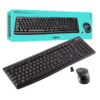
Reviews
There are no reviews yet.