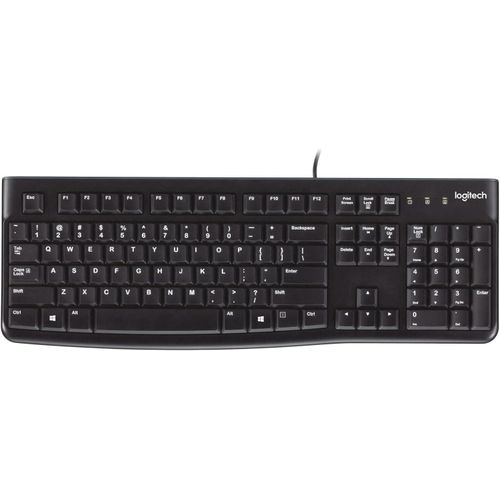
Logitech K120 Wired Keyboard
The Logitech K120 wired keyboard is a full-size, plug-and-play USB keyboard built for everyday computing on Windows and Linux desktops and laptops. It connects via USB with no drivers or software required, and its standard layout — including a full row of function keys and an integrated number pad — makes it immediately familiar to users coming from any previous keyboard. It suits office workstations, reception desks, shared computer labs, and any environment where a dependable, low-maintenance keyboard is needed.
Ready in Seconds, No Setup Required
Plug the K120’s USB cable into any available USB port and the keyboard is ready to use. There is no pairing process, no receiver to manage, and no software to install. Windows and Linux systems recognise the keyboard immediately via native HID drivers. Consequently, the K120 is a practical option for IT deployments where per-unit configuration time needs to be minimal.
Built to Handle Daily Wear
Logitech rates the K120 for up to 10 million keystrokes per key — excluding the number lock key — which equates to several years of sustained daily use in a typical office role. The spill-resistant design handles liquid spillage of up to 60 ml, with internal drainage channels directing liquid away from the circuit board. Additionally, a fade-resistant printing process keeps key legends legible over extended use, even on heavily trafficked workstations.
Technical Specifications
Connectivity
| Specification | Detail |
|---|---|
| Connection Type | Wired USB |
| Cable Length | 150 cm (59 in) |
| Plug Type | USB-A |
| Plug-and-Play | Yes — no drivers required |
Layout & Keys
| Specification | Detail |
|---|---|
| Layout | Full-size QWERTY |
| Number Pad | Yes — integrated 10-key |
| Function Keys | F1–F12, full-size |
| Key Type | Membrane, deep-profile |
| Keystroke Durability | Up to 10 million keystrokes (excludes Num Lock key) |
| Curved Space Bar | Yes |
Indicators
| Specification | Detail |
|---|---|
| Caps Lock Indicator | Yes — LED |
| Num Lock Indicator | Yes — LED |
Physical
| Specification | Detail |
|---|---|
| Width | 450 mm (17.72 in) |
| Depth | 155 mm (6.10 in) |
| Height | 23.5 mm (0.93 in) |
| Weight | 550 g (19.4 oz) |
| Tilt Legs | Yes — adjustable height |
| Colour | Black |
| Recycled Content | 51% post-consumer recycled plastic (body parts) |
Durability
| Specification | Detail |
|---|---|
| Spill Resistance | Tested to 60 ml liquid spillage |
| Key Legend Durability | Anti-fade printing |
Compatibility
| Platform | Supported |
|---|---|
| Windows XP, Vista, 7, 8, 10, 11 or later | ✓ |
| Linux kernel 2.6 or later | ✓ |
| macOS | ✗ — not compatible |
Part Information
| Specification | Detail |
|---|---|
| Model Number | K120 |
| Part Number | 920-002478 |
| Internal SKU | KB-Sequoia |
Use Cases & Applications
Office and Corporate Deployments
The K120 suits volume desktop deployments in corporate environments where IT teams need a consistent, low-cost, zero-configuration keyboard across multiple workstations. Plug-and-play USB connectivity eliminates per-unit pairing or driver installation time. The spill-resistant design and 10 million keystroke rating reduce replacement frequency in high-use environments. Furthermore, the standard full-size layout ensures all users can start working without adjustment, regardless of prior keyboard experience.
Reception, Data Entry, and Counter Positions
The integrated number pad makes the K120 well suited to roles involving frequent numerical input — reception desks, point-of-sale adjacent workstations, data entry roles, and accounting positions. Deep-profile membrane keys deliver a consistent actuation feel across the full key travel, supporting sustained input accuracy over long sessions. Additionally, anti-fade key legends maintain legibility in environments where multiple users handle the keyboard daily or cleaning is routine.
Education and Computer Labs
In shared computing environments such as school labs and university classrooms, the K120’s durability and plug-and-play simplicity reduce both maintenance overhead and per-unit cost. The spill-resistant build provides a degree of protection in environments where accidental liquid contact is a routine risk. However, IT administrators should note that the K120 does not support macOS — it works with Windows and Linux lab environments only.




 No products in the cart.
Reviews
There are no reviews yet.