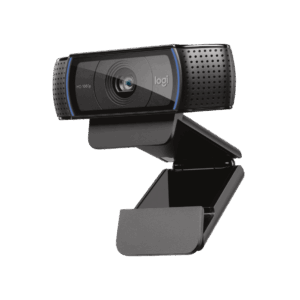
The Logitech C270 HD webcam is a compact, plug-and-play USB webcam designed for everyday video calls, online meetings, and distance learning. It delivers 720p video at 30 frames per second with a 55° diagonal field of view, automatic RightLight 2 exposure correction, and a built-in noise-reducing mono microphone — all through a single USB-A connection that requires no drivers or software installation. The universal mounting clip attaches to most laptop screens and LCD monitors, making the C270 a practical upgrade over integrated laptop cameras for users who need clearer, more consistent video output.
What the C270 Delivers and What It Does Not
The C270 covers the core requirements of everyday video conferencing: sharp 720p widescreen video, automatic light adjustment, and clear voice pickup up to 1.5 m. However, it uses fixed focus rather than autofocus, which means it works well for a static seated position but does not track focus changes when users move closer or further from the lens. It also lacks a privacy shutter, a pan/tilt mechanism, and background correction features found in higher-tier Logitech webcams. For users whose primary need is reliable, uncomplicated HD video calling, these omissions are unlikely to affect daily use.
RightLight 2 — Automatic Exposure Without Manual Adjustment
The RightLight 2 feature analyses the scene and adjusts exposure settings automatically, compensating for backlit windows, dim rooms, and variable indoor lighting. This produces brighter, more naturally contrasted images without requiring users to configure white balance or exposure settings manually. Additionally, the built-in RightSound noise-suppression microphone reduces ambient keyboard noise, background conversation, and environmental interference during calls.
Video
| Specification |
Detail |
| Max Video Resolution |
1280 × 720 (720p HD) |
| Frame Rate |
Up to 30 fps |
| Video Format |
16:9 widescreen |
| Video Resolutions Available |
360p, 480p, 720p (16:9); 320×240, 640×480, 800×600 (4:3) |
| Focus Type |
Fixed |
| Focal Length |
4.0 mm |
| Lens Type |
Plastic |
| Field of View (diagonal) |
55° |
| Light Correction |
RightLight 2 — automatic |
Still Image
| Specification |
Detail |
| Still Capture Resolution |
Up to 3 MP (software-enhanced) |
| Native Sensor Resolution |
1.2 MP (1280 × 960) |
Microphone
| Specification |
Detail |
| Type |
Built-in mono, noise-suppression |
| Technology |
RightSound |
| Pickup Range |
Up to 1.5 m (5 ft) |
Connectivity
| Specification |
Detail |
| Connection Type |
USB-A |
| USB Standard |
High Speed USB 2.0 |
| USB VID/PID |
VID_046D & PID_081A |
| Cable |
Attached — 1.5 m (5 ft) |
| Plug-and-Play |
Yes — no drivers required |
Indicators & Features
| Specification |
Detail |
| Activity LED |
Yes |
| Privacy Shutter |
No |
| Pan/Tilt/Zoom |
No |
| Mounting |
Universal clip (laptop, LCD monitor, shelf) |
Physical
| Specification |
Detail |
| Height |
72.91 mm (2.87 in) |
| Width |
31.91 mm (1.26 in) |
| Depth |
66.64 mm (2.62 in) |
| Weight |
75 g (2.65 oz) |
| Colour |
Dark Grey (Black) |
| Recycled Content |
65% post-consumer recycled plastic (body parts) |
Compatibility
| Platform |
Supported |
| Windows 7 or later |
✓ |
| macOS 10.10 or later |
✓ |
| ChromeOS |
✓ |
| Software Required |
None — plug-and-play |
Part Information
| Specification |
Detail |
| Part Number |
960-001063 |
| In the Box |
C270 webcam with 1.5 m attached USB-A cable, user documentation |
| Warranty |
2-year limited hardware warranty |
Home Office and Remote Work Video Calls
The C270 targets users whose primary requirement is a reliable, sharper video feed for daily calls on Zoom, Teams, or Google Meet without investing in a higher-tier webcam. Integrated laptop cameras are generally adequate, but they are positioned at fixed angles, often have smaller sensors, and are more susceptible to poor lighting. The C270 mounts at a deliberate eye-level position on the monitor, delivers RightLight 2 automatic exposure correction, and connects over USB-A in seconds. Consequently, it reduces the setup friction that affects users joining calls on multiple different devices or shared workstations.
Education and Distance Learning
In both home study and classroom settings, the C270 provides clear widescreen video for remote learning platforms, virtual tutoring, and video-based assessment. The fixed mounting clip positions the camera consistently above the screen, keeping the user’s face framed at a natural angle. The noise-reducing microphone reduces distracting background sounds in homes and open classrooms, improving voice clarity for both the speaker and the receiving end of the call. Furthermore, the plug-and-play USB setup works immediately on managed Chromebooks and school-issued Windows laptops without software installation privileges.
Reception, Counter, and Shared Workstation Environments
For fixed-position workstations where a reliable, low-maintenance camera handles video check-ins, remote meetings, or customer-facing calls, the C270 provides a durable, consistent video source that requires no maintenance or configuration beyond initial plug-in. The universal clip adapts to most desktop monitor thicknesses, and at 75 g with an integrated cable, the C270 creates minimal desk clutter. However, users in these environments who require a privacy shutter for compliance or policy reasons should consider stepping up to a webcam with a built-in privacy cover, such as the Logitech Brio 105.



 No products in the cart.
Reviews
There are no reviews yet.