
Logitech Brio 4K Webcam – Graphite
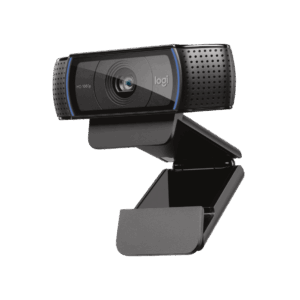
The Logitech Brio 4K Webcam is a professional Ultra HD desktop camera built for executives, power users, content creators, and IT-managed business environments that demand the highest level of video quality. It streams crystal-clear video up to 4K with autofocus, 5x digital zoom, and RightLight 3 auto light correction — producing sharp, detailed footage from low-light offices through to direct sunlight. Logitech With Windows Hello facial recognition, an adjustable field of view, and USB 3.0 connectivity, the Brio 4K occupies a different tier to standard 1080p webcams and is suited to users where video quality is a professional priority.
Ultra HD Resolution Across Multiple Frame Rates
The Brio 4K delivers Ultra HD video at 30 fps, HD 1080p at up to 60 fps, and HD 720p at up to 90 fps Logitech, giving users flexibility depending on their available bandwidth and application requirements. Note that achieving 4K resolution requires a USB 3.0 port; connecting via USB 2.0 limits output to 1080p at 30 fps. The 4K glass lens carries an F/2.0 aperture with autofocus from 10 cm to infinity, meaning the camera handles both close-up detail and wider room shots with equal clarity.
RightLight 3 with HDR for Demanding Environments
RightLight 3 automatically adjusts to help you look your best in any lighting environment, including low light, direct sunlight, and high-contrast conditions. Logitech This is a meaningful step up from RightLight 2 found in lower-tier webcams, as the addition of High Dynamic Range (HDR) processing retains detail simultaneously in bright and shadowed areas of the frame. Consequently, users in offices with large windows or variable artificial lighting see fewer exposure issues during calls.
Windows Hello and Secure Login
Powered by both optical and infrared sensors, the Brio 4K enables fast and secure facial recognition for Windows Hello — simply look into the webcam lens and you are signed in. Logitech This removes password dependency for Windows 10 and Windows 11 logins, which is particularly useful in shared hot-desking environments or on any machine where login speed and access security both matter. The infrared sensor operates independently of the video stream and functions in low-light conditions.
Technical Specifications
Physical
| Attribute | Detail |
|---|---|
| Height | 27 mm (1.06 in) |
| Width | 102 mm (4.02 in) |
| Depth | 26.5 mm (1.04 in) |
| Weight | 85 g (3 oz), excluding cable |
| Cable | USB-A to USB-C, 2.2 m (7.2 ft) |
| Colour | Graphite |
| Model Number | V-U0040 |
Video
| Attribute | Detail |
|---|---|
| Max Resolution | 4K Ultra HD (4096 × 2160 px) @ 30/24 fps |
| 2K WQHD | 2560 × 1440 px @ 30/24 fps |
| Full HD | 1080p (1920 × 1080 px) @ 60/30/24 fps |
| HD | 720p (1280 × 720 px) @ 90/60/30/24 fps |
| Lens | 4K2K glass lens, F/2.0 (4P1G) |
| Autofocus Range | 10 cm to infinity |
| Zoom | 5x digital |
| Field of View (Diagonal) | 65°, 78°, or 90° — user-selectable |
| Light Correction | RightLight 3 with HDR |
| Video Compression | MJPEG |
Audio
| Attribute | Detail |
|---|---|
| Microphones | Dual omnidirectional, 16-bit with noise cancellation |
Connectivity & System Requirements
| Attribute | Detail |
|---|---|
| Connection | USB-A (via USB-A to USB-C cable) |
| USB for 4K | USB 3.0 required |
| USB 2.0 | Limited to 1080p @ 30 fps |
| Activity Indicator | White LED (active) |
| Mounting | Detachable universal clip + ¼” tripod thread |
Compatibility
| Attribute | Detail |
|---|---|
| Windows | Windows 10 or later (Windows Hello supported) |
| macOS | macOS 10.12 or later |
| Chrome OS | Supported |
| Certifications | Microsoft Teams, Zoom, Google Meet |
In the Box
- Logitech Brio 4K Webcam with detachable mounting clip
- Attachable privacy shutter
- USB-A to USB-C cable (2.2 m)
- Travel bag
- User documentation
Use Cases & Applications
Executive and High-Stakes Video Calls
For professionals whose calls carry real weight — board meetings, client pitches, senior leadership check-ins — the Logitech Brio 4K delivers a visibly sharper image than standard 1080p webcams. The adjustable field of view allows users to frame a clean head-and-shoulders view at 65° or open out to 90° to include more of the room Logitech, depending on whether the meeting is a one-to-one or a small group. RightLight 3 HDR handles office lighting variability without requiring any manual camera adjustment between calls.
Content Creation and Live Streaming
The Brio 4K streams crystal-clear video with superb resolution, colour, and detail Logitech, making it a practical choice for professionals who record instructional video, host webinars, or live-stream alongside standard business use. The 90 fps mode at 720p produces notably smooth motion for screen recording or fast-moving presentation content. Additionally, the sharp 4K output makes it effective for green screen work, as clean edges at high resolution reduce post-processing effort.
Secure Workstations and Hot-Desking Environments
The infrared sensor supports Windows Hello facial recognition, allowing users to log in immediately without entering a password. Logitech This makes the Brio 4K a strong match for any organisation using shared workstations, hot-desking layouts, or security-sensitive Windows environments. IT teams can additionally manage and monitor deployed units using Logitech Sync across the organisation.



 No products in the cart.
Reviews
There are no reviews yet.