Logitech MK220 Wireless Keyboard and Mouse Combo
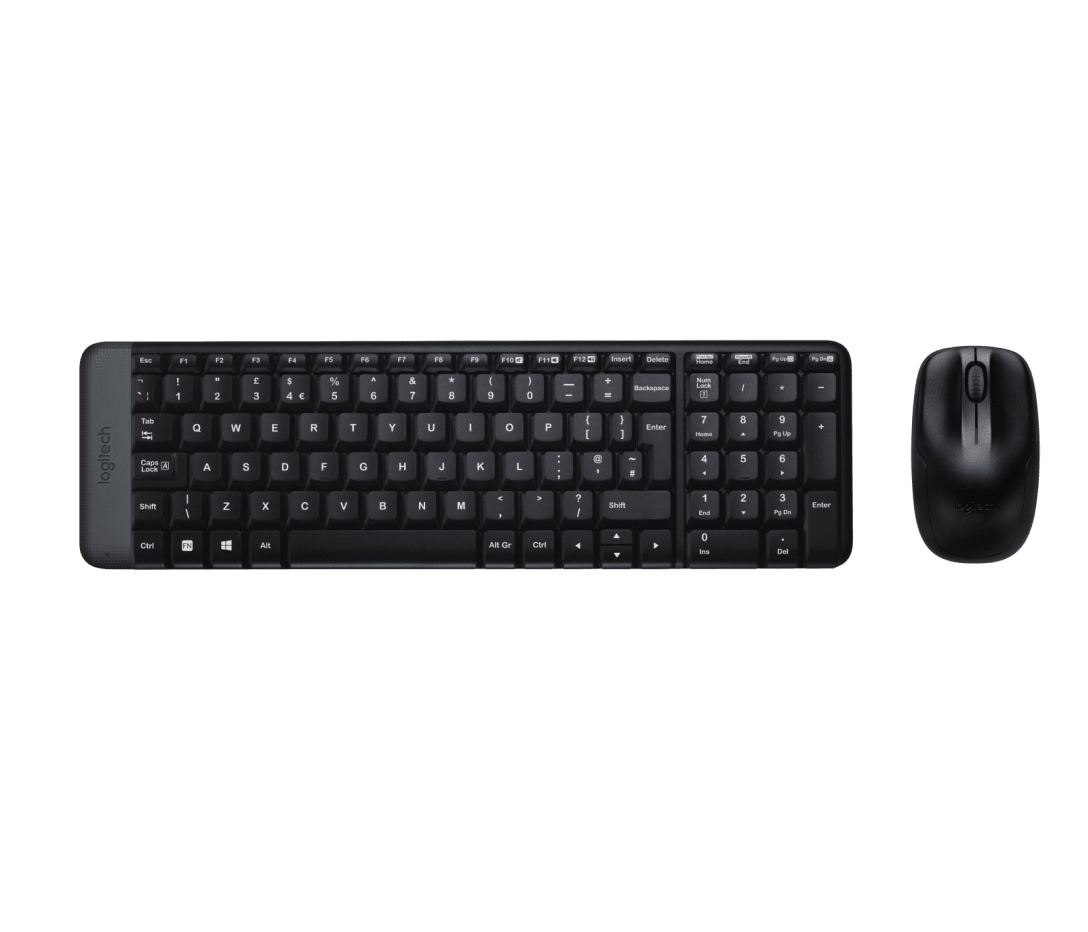
The Logitech MK220 wireless keyboard and mouse combo delivers a cable-free desktop input solution in a compact, space-saving form factor. The keyboard retains a full number pad despite sitting approximately 36% smaller than a standard full-size keyboard, making it well suited to users with limited desk space who still need numerical input capability. A single 2.4 GHz nano receiver connects both devices simultaneously, and the combo works immediately out of the box without driver installation on Windows and ChromeOS.
Compact Without Sacrificing Keys
The MK220’s keyboard packs a number pad, full F-key row, and standard QWERTY layout into a shorter footprint by reducing the spacing between key sections. This brings the mouse closer to the home position, reducing lateral arm reach during extended sessions. Additionally, the deep-profile keycaps provide a consistent tactile response across the full layout, and each key handles up to 5 million actuations.
One Receiver, Two Devices
The included nano USB receiver pairs with both the K220 keyboard and M150 mouse simultaneously. Unlike the Logitech Unifying system, this receiver works only with these two paired devices — it does not extend to additional peripherals. Users who lose the receiver cannot replace it with a standard Unifying receiver; the combo ships as a matched pair.
Connectivity
| Specification |
Detail |
| Wireless Protocol |
2.4 GHz (nano USB receiver) |
| Wireless Range |
Up to 10 m (33 ft) |
| Receiver |
Nano USB receiver (included — pairs both devices) |
| Bluetooth |
No |
| Plug-and-Play |
Yes — no drivers required |
Keyboard (K220)
| Specification |
Detail |
| Layout |
Compact QWERTY with integrated 10-key number pad |
| Key Type |
Deep-profile membrane |
| Function Keys |
F1–F12, full-size |
| Special Keys |
Fn, Num Lock, Caps Lock, Scroll Lock, music controls |
| Key Life |
Up to 5 million keystrokes (excludes Num Lock key) |
| Spill Resistance |
Tested to 60 ml liquid spillage |
| Encryption |
128-bit AES |
| Battery |
2 × AAA alkaline (included) |
| Battery Life |
Up to 24 months |
| Backlighting |
No |
Keyboard Dimensions
| Specification |
Detail |
| Width |
381 mm |
| Depth |
112 mm |
| Height |
17.78 mm |
| Weight |
320 g |
Mouse (M150)
| Specification |
Detail |
| Sensor |
Smooth optical tracking |
| Buttons |
3 (left-click, right-click, scroll wheel click) |
| Scroll Wheel |
Yes — line-by-line, optical |
| Hand Orientation |
Ambidextrous (symmetrical) |
| Battery |
2 × AA alkaline (included) |
| Battery Life |
Up to 12 months |
Mouse Dimensions
| Specification |
Detail |
| Length |
107 mm |
| Width |
60 mm |
| Height |
40 mm |
| Weight |
112 g |
Sustainability
| Component |
Recycled Plastic Content |
| Mouse |
66% post-consumer recycled plastic |
| Keyboard |
44% post-consumer recycled plastic |
| Receiver |
75% post-consumer recycled plastic |
| Carbon Footprint |
Certified carbon neutral (5.72 kg CO₂e, offset to zero) |
Compatibility
| Platform |
Supported |
| Windows 10, 11 or later |
✓ |
| ChromeOS |
✓ |
| macOS |
✗ — not compatible |
Part Information
| Specification |
Detail |
| Part Number |
920-003554 |
| In the Box |
K220 keyboard, M150 mouse, nano USB receiver, 2 × AAA batteries, 2 × AA batteries, user documentation |
| Warranty |
3-year limited hardware warranty |
Space-Constrained Desks and Home Workstations
The MK220 targets users who want a wireless keyboard and mouse without the cable clutter, but whose desk space limits the footprint a full-size combo would occupy. The compact keyboard brings the mouse significantly closer to the typing position, reducing the lateral arm extension that contributes to shoulder and wrist strain during long sessions. Furthermore, eliminating the cable removes a common source of desk clutter without requiring Bluetooth configuration or driver installation.
General Office and Administrative Use
For users engaged in data entry, document editing, spreadsheet work, and general Windows computing, the MK220 covers all standard input requirements. The number pad handles numerical input efficiently, the F-key row supports application shortcuts, and the music control hotkeys manage media playback directly. The 10 m wireless range additionally allows flexible monitor and workstation positioning, particularly in setups where the PC tower sits away from the primary desk surface.
Education and Shared Computing Environments
The MK220’s plug-and-play setup removes the need for IT configuration on each deployment. Plug the receiver into a USB port and both devices connect immediately on Windows or ChromeOS. The spill-resistant keyboard design provides a degree of protection in environments where liquid contact is a routine risk, such as classrooms or shared lab workstations. However, administrators should note the MK220 does not support macOS — it suits Windows and ChromeOS environments only.




 No products in the cart.
Reviews
There are no reviews yet.