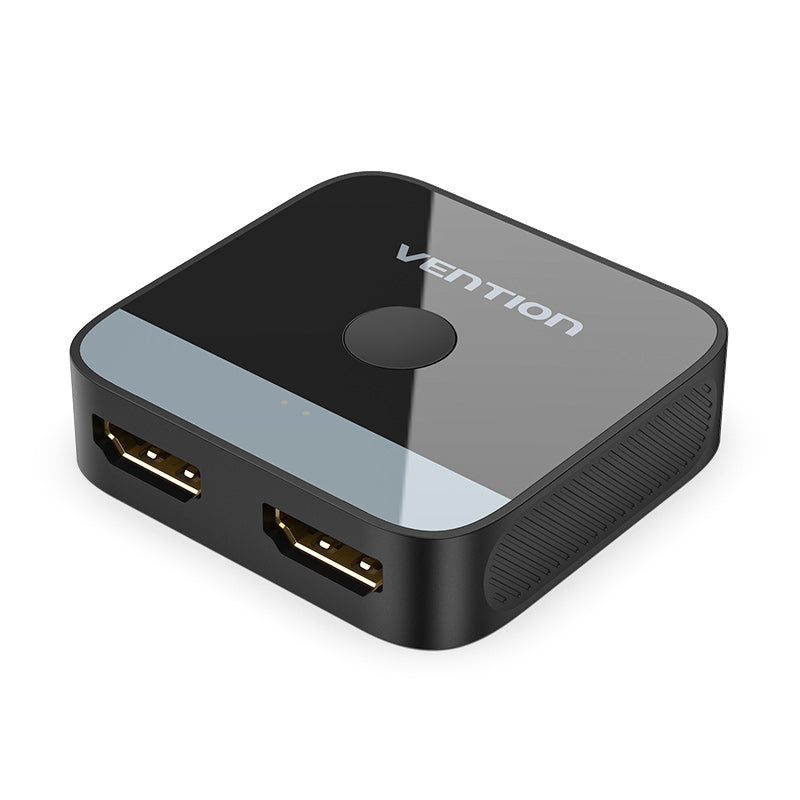
Vention 2-Port HDMI Bi-Direction 4K Switcher (AKOB0)
The Vention AKOB0 is a compact bidirectional HDMI switcher that allows you to connect two HDMI sources to one display or one source to two displays. This manual switcher supports 4K resolution at 60Hz with full HDR compatibility, making it perfect for home offices, gaming setups, and entertainment systems where multiple devices share a single monitor or TV. The plug-and-play design requires no external power or software installation, offering instant connectivity with a simple button press.
Technical Specifications
Video Performance
- Maximum Resolution: 4K (3840×2160) at 60Hz
- HDR Support: HDR10, standard dynamic range
- Color Depth: Up to 36-bit Deep Color (12-bit per channel)
- Chroma Subsampling: 4:4:4, 4:2:2, 4:2:0
- Bandwidth: 18Gbps (HDMI 2.0 compliant)
Audio Capabilities
- Audio Pass-Through: LPCM, Dolby Digital, DTS
- Audio Formats: Up to 7.1 channel surround sound
- Audio Sample Rate: Up to 192kHz
Physical Specifications
- Port Configuration: 2 HDMI ports (bidirectional)
- Switching Method: Manual push-button
- Connector Type: HDMI Type-A female ports
- Dimensions: 65mm × 55mm × 18mm (L × W × H)
- Weight: Approximately 50g
- Housing Material: ABS plastic with aluminum alloy panel
- Indicator Light: LED status indicator for active port
Compatibility & Power
- HDMI Version: 2.0 (backward compatible with 1.4, 1.3)
- HDCP Support: HDCP 2.2, HDCP 1.4
- Power Requirements: Bus-powered via HDMI (no external adapter needed for most devices)
- Optional Power: Micro-USB port for external power in low-power source scenarios
- Operating Temperature: 0°C to 45°C (32°F to 113°F)
Use Cases & Applications
Dual-Computer Home Office Setup
Connect two laptops or a desktop and laptop to a single monitor for efficient workspace management. Switch between your work computer and personal device instantly without unplugging cables. This setup proves particularly valuable during video conferences when you need to reference content from a secondary computer.
Gaming Console Switching
Share one display between your gaming console and streaming device or PC. Connect your PlayStation, Xbox, or Nintendo Switch alongside a media player to your TV, then switch sources with a button press. The zero-latency design ensures responsive gameplay without input lag introduced by powered switchers.
Home Entertainment Configuration
Use the bidirectional functionality to route a single Blu-ray player or streaming device to two different TVs in adjacent rooms. This configuration works well for households where the same content needs to display in multiple viewing areas, though only one display can show content at a time.
Presentation and Training Rooms
Connect a presentation laptop and a media playback device to the same projector or display. Instructors can switch between live demonstrations and pre-recorded training materials seamlessly. Additionally, the compact form factor allows for discreet placement near the display or on a podium.
Content Creation and Review
Video editors and designers can switch between their editing workstation and a client preview device connected to the same reference monitor. This setup enables quick comparisons of how content appears on different source devices without changing physical connections.
KVM Alternative for Basic Switching
While not a full KVM switch, the AKOB0 provides video switching for users who handle keyboard and mouse separately. Pair with Bluetooth peripherals or a separate USB switch for a complete dual-computer setup at lower cost than traditional KVM solutions.





 No products in the cart.
Reviews
There are no reviews yet.