
UGREEN VGA to HDMI Adapter – Active 1080P Converter with Audio (CM513 / 50945)
The UGREEN VGA to HDMI adapter is an active signal converter that connects a computer or laptop with a VGA output to any display, monitor, projector, or television with an HDMI input. It suits users whose older desktop PC or laptop lacks an HDMI port but whose monitor or projector accepts only HDMI. The CM513 handles the analogue-to-digital conversion internally, outputs Full HD 1080P video at 60Hz, and adds a 3.5mm audio input so both video and sound reach the display through a single HDMI connection.
Why an Active Converter is Required
VGA and HDMI are fundamentally incompatible signal types. VGA carries an analogue video signal; HDMI carries a digital signal containing both video and audio data. A passive cable or simple plug adaptor cannot bridge the two — an active conversion chip is required to digitise the VGA signal and encode it into a valid HDMI datastream.
The CM513 is a unidirectional adapter that converts the analogue signal from a VGA port to an HDMI output. DataBlitz Consequently, it works only in one direction: VGA source device → HDMI display. It cannot convert HDMI to VGA. Users who need the reverse — connecting an HDMI laptop to a VGA projector — should instead look at the UGREEN HDMI to VGA Adapter (model 40248).
Signal Conversion and Audio Handling
Because HDMI carries audio and VGA does not, the CM513 includes a 3.5mm stereo audio input port. This audio input accepts a sampling rate of up to 24-bit at 32kHz, 44.1kHz, or 48kHz Global Brand, covering CD-quality and standard computer audio output. A 1-metre 3.5mm audio cable is included in the box. Plugging this into the headphone or line-out jack of the source computer routes audio into the adapter, where it is encoded alongside the video and transmitted over HDMI to the display or projector’s speakers.
If the destination display has no internal speakers — as is the case with most projectors and many office monitors — the HDMI audio output can alternatively feed a separate HDMI-capable amplifier or AV receiver.
Power Supply
The active conversion chip requires external power. The CM513 is powered via USB-C at 5V/1A Global Brand, and a 1-metre USB-C power cable is included. This can connect to any USB-C port on the source computer, a USB wall adapter, or a USB port on a hub. The power draw is low enough that most laptop USB-C ports supply it without difficulty. Additionally, the adapter is hot-swappable — it can be connected and disconnected without rebooting or reinstalling drivers.
What This Adapter Cannot Do
This is a frequently misunderstood product category. The CM513 does not support: HDMI to VGA conversion; dual-display or extended desktop output (it replaces the VGA output, not augments it); resolutions above 1920×1080; or audio output without the separate 3.5mm cable connection. Users expecting bidirectional operation or 4K output should consider a different product.
Technical Specifications
Signal Conversion
| Parameter | Value |
|---|---|
| Conversion Direction | VGA (analogue) → HDMI (digital) — one-way only |
| Input Interface | VGA Male (DE-15, 15-pin) |
| Output Interface | HDMI Female (Type A) |
| Maximum Output Resolution | 1920×1080 @ 60Hz (1080P Full HD) |
| HDMI Standard | HDMI 1.4 |
Audio
| Parameter | Value |
|---|---|
| Audio Input Port | 3.5mm stereo mini jack |
| Audio Sampling Rate | Up to 24-bit, 32kHz / 44.1kHz / 48kHz |
| Audio Transmission | Via HDMI output (alongside video) |
Power
| Parameter | Value |
|---|---|
| Power Input Port | USB-C |
| Power Requirement | 5V / 1A |
| Power Source | USB-C port on host PC, hub, or wall adapter |
Physical
| Parameter | Value |
|---|---|
| Adapter Body Dimensions | 45.5 × 36 × 10 mm |
| Integrated Cable Length | 15 cm (VGA end to adapter body) |
| Housing Material | PC + ABS |
| Colour | Black |
| Model | CM513 |
| Part Number | 50945 |
| Warranty | 2 years |
In the Box
- UGREEN CM513 VGA to HDMI Adapter
- 1 m USB-C power cable
- 1 m 3.5mm stereo audio cable
Compatibility — Source Devices (VGA Output)
| Device Type | Compatible |
|---|---|
| Desktop PCs with VGA port | ✓ |
| Laptops with VGA port | ✓ |
| Older workstations and thin clients | ✓ |
| Devices with HDMI output (reverse) | ✗ — use model 40248 instead |
Compatibility — Destination Displays (HDMI Input)
| Device Type | Compatible |
|---|---|
| HDMI monitors and LCD screens | ✓ |
| HDMI projectors | ✓ |
| Smart TVs with HDMI input | ✓ |
| Displays with VGA input only | ✗ — use UGREEN VG101 cable instead |
Use Cases and Applications
Connecting an Older Desktop PC to a Modern HDMI Monitor
Many business desktop PCs manufactured before 2015 carry only a VGA video output. Modern monitors increasingly offer HDMI as their primary or sole input, with VGA either secondary or absent entirely. The CM513 bridges this gap without requiring a graphics card upgrade. The user connects the adapter’s VGA plug to the PC’s video output, runs an HDMI cable from the adapter’s female port to the monitor, and connects the USB-C power cable to any available USB port on the PC. Furthermore, connecting the included 3.5mm cable between the PC’s headphone output and the adapter’s audio port routes sound to the monitor’s built-in speakers if present.
Presentations from Legacy Laptops to HDMI Projectors
Conference rooms and training venues are increasingly replacing older VGA projectors with HDMI-only models. Presenters using older business laptops — which may carry a VGA port but no HDMI — can use the CM513 to connect directly to the venue’s HDMI projector or display screen. The adapter is compact enough to carry in a laptop bag pocket alongside a short HDMI cable. Additionally, the plug-and-play design means setup requires no software configuration — the adapter is ready within seconds of being connected.
Educational Institutions Upgrading Display Infrastructure
Schools and colleges often operate a mixed estate of older computers alongside newer HDMI display technology. The CM513 allows existing VGA-output machines to connect to newly installed HDMI projectors or interactive displays without requiring a full hardware refresh of the computer inventory. Consequently, institutions can upgrade their display infrastructure independently of their PC replacement cycle, reducing capital expenditure. The audio passthrough also preserves the ability to play video and audio content through the room’s display speakers.
 No products in the cart.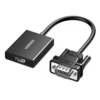
Reviews
There are no reviews yet.